 PH
PH
File size: 2.34 MB
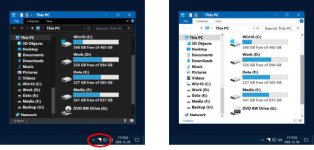
Easy Dark Mode allows you to switch between the system-wide dark/light display modes available in Windows 10/11 operating systems. It provides a one-click method and hotkey to switch display modes.
Different desktop wallpapers can be assigned to the dark/light display modes. When switching display modes, the desktop wallpaper also switches automatically. The software includes a wallpaper creator to create custom desktop wallpapers.
Key features of Easy Dark Mode
One-click switching between dark/light display modes
Hotkey
Wallpaper creator
Desktop wallpaper manager
Free to use
Works even under non-activated Windows
Screen :
What's New
Spoiler contents are visible only to Established Members.
HOMEPAGE
Code:
https://www.wintools.info
You do not have permission to view the full content of this post. Log in or register now.
You do not have permission to view the full content of this post. Log in or register now.
You do not have permission to view the full content of this post. Log in or register now.