 PH
PHWhat is the Geekersoft PDF Converter?
If you’re in search of graduation literature or papers on the internet, you may come across numerous PDF documents. However, with the help of Geekersoft PDF Converter, you can effortlessly convert these PDFs into any desired format. Geekersoft PDF Converter is a robust and specialized application designed specifically for PDF conversion purposes. It offers a range of conversion options, allowing you to convert PDFs to formats such as Word, Excel, PowerPoint, PNG, JPG, and even plain text.One remarkable feature of Geekersoft PDF Converter is its ability to preserve the original layout and table format of the converted documents. The software ensures that important information remains intact during the conversion process. Furthermore, this PDF converter tool not only converts PDFs to other formats but also allows you to convert Word documents, Excel spreadsheets, PowerPoint presentations, and various image formats back to PDF format. This versatility makes it a comprehensive tool for managing different file types and simplifies the task of creating PDF files.
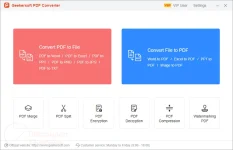
Key Features:
- Geekersoft PDF Converter is a simple offline PDF converter available for Windows devices that can convert a PDF to Word, PPT, Excel, PNG, JPG, and TXT files.
- It also provides the most reliable conversion systems in the market for converting your Word, Excel, PowerPoint, TXT, or image formats to PDF files.
- This tool provides access to several features and functions, including PDF merger/split functions, encryption with 128/256-bit layers, PDF compression, and watermarking PDF functions.
- This PDF converter also supports batch processing allowing you to convert multiple files with a single click.
How to get the Geekersoft PDF Converter license key for free?
Step 1. Download the installer for version 3.9.9 –> You do not have permission to view the full content of this post. Log in or register now.Step 2. Install the program on your computer (choose “Run as administrator” to prevent installation issues).
Register with the below Geekersoft PDF Converter license code:
AS3WFO-D96X8Q-12YYMO-7QW5-SXGFHD
Terms & Conditions
- This is a 1-computer 1-year license, for noncommercial use
- No free technical support
- No free upgrades to future versions
- You must redeem the license key before Jan 08, 2025, GMT+0 08:00


