 PH
PH-
Welcome to PHCorner Forums! Sign up for free to unlock full access and exclusive privileges, including:
- Asking questions about computer and mobile issues
- Discovering internet tips for your mobile network and computer
You are using an out of date browser. It may not display this or other websites correctly.
You should upgrade or use an alternative browser.
You should upgrade or use an alternative browser.
🔒 Closed Queencee vpn v8 infinity (all networks)
- Thread starter queencee
- Start date
- Status
- Not open for further replies.
Christian1601
Leecher
Ate Queencee thank you po pero bakit hindi po ako makaconnect laging disconnected? Globe po gamit ko.
Salamat pa din hehe
Salamat pa din hehe
Gabriel ern
Fanatic
Good evening ma'am queence.pasalamat sa mga naibahagi mo samin.laking tulong talaga nito,lalo na sa mga nagaaral.goodluck and more power pa sa mga gagawin mo pang bago.belated merry chrismast and happy newyear.ganun din sa mga ka pH.
Commander Una
Eternal Poster
thanks for this ma'am
thanks for this ma'am
thanks for this ma'am
Youngyanix
Journeyman
thanks !!
thanks !!
try to check yung APN settings mo..
thanks !!
try to check yung APN settings mo..
strongenough
Journeyman
Gumagana sya sa samsung ko. Pero hindi sa oppo ko.
Sinunod ko naman lahat ng settings..
Sinunod ko naman lahat ng settings..
scien you are most welcometnx po.. keep on sharing..
alphaelx My android unit is also 4g capable, you need to use a sim that has the 4g capability too, else you won't see the symbol 4g when in use.I need help. Doesn't work if it is 4G. Globe user.
If you can use Default Settings for Globe the better, (search for threads with tutorials for Globe Default here on PHC)
then if it is not available for your location, you can use MGC.
You are a globe / tm sim user, ok...have you made an apn mgc on your phone settings before proceeding to the vpn app? if not, please do this first :
•mgc apn phone setting
create apn mgc on your phone.
you may follow these steps...
1. settings
2. more
3. mobile network
4. access point name
5. choose globe telecom
6.choosemyglobeconnect
7. name:myglobeconnect
8.apn:You do not have permission to view the full content of this post. Log in or register now.
9. proxy: 203.177.42.214 or 108.67.222.222
10. port 8080
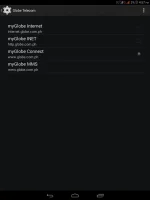
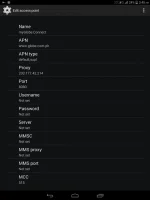
-do all of these on your cellphone's settings
and now let us proceed to queencee vpn v8 infinity. click on the more settings
·more settings
connect trough an http proxy: check
use the following settings: check
hostaddress:203.177.42.214
port: 8080
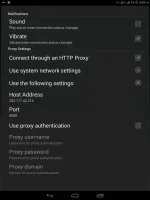
-input the correct globe/tm handler settings (See Page 1 for the guide and yes choose proxy server and real proxy server, type them in)
-hit mobile data "on"
: if you can see theconnected icon status and the key on top, those are the indications that you are successfully connected totheinternet using the vpn via mgc.
OR... (Change your APN to http.globe.com.ph incase you decide to register to any Globe promo)
Then proceed to QueenCee VPN's More Settings, tick on Use System Network Settings
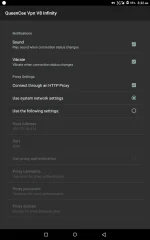
On Page 1, there is a list of Proxy Servers for Globe/TM. Mix match them with the real proxy servers. There will be a right combination for your location.
Always set your server/region to India/Korea/Spain for a no capping connection
Christian1601Ate Queencee thank you po pero bakit hindi po ako makaconnect laging disconnected? Globe po gamit ko.
Salamat pa din hehe
·Can you check if your "Network Mode" is set to "3g Only"?There are android units that are on auto...and that you have been juggling from 3g to 2g back and forth without noticing it. This directly affects your connection since VPNs only works best with 3g.
· Your 3g should have the h+ / h or the triangles on the signal bar pointing up and down and it should be there for you to have a stable connection.if it connects then it is safe to say that there is no problem with the VPN or the Handler Settings. It is just a signal and location issue.
If you can use Default Settings for Globe the better, (search for threads with tutorials for Globe Default here on PHC)
then if it is not available for your location, you can use MGC.
You are a globe / tm sim user, ok...have you made an apn—mgc on your phone settings before proceeding to the vpn app? if not, please do this first :
•mgc apn phone setting
create apn—mgc on your phone.
you may follow these steps...
1. settings
2. more
3. mobile network
4. access point name
5. choose globe telecom
6.choosemyglobeconnect
7. name:myglobeconnect
8.apn:You do not have permission to view the full content of this post. Log in or register now.
9. proxy: 203.177.42.214 or 108.67.222.222
10. port 8080
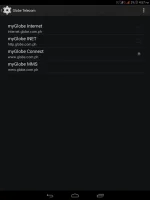
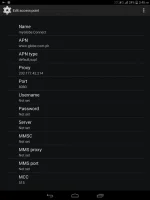
-do all of these on your cellphone's settings
and now let us proceed to queencee vpn v8 infinity. click on the more settings
·more settings
connect trough an http proxy: check
use the following settings: check
hostaddress:203.177.42.214
port: 8080
You do not have permission to view the full content of this post. Log in or register now.
-input the correct globe/tm handler settings (See Page 1 for the guide and yes choose proxy server and real proxy server, type them in)
-hit mobile data "on"
: if you can see theconnected icon status and the key on top, those are the indications that you are successfully connected totheinternet using the vpn via mgc.
OR... (Change your APN to http.globe.com.ph incase you decide to register to any Globe promo)
Then proceed to QueenCee VPN's More Settings, tick on Use System Network
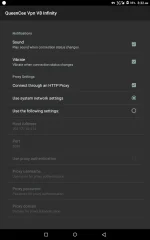
On Page 1, there is a list of Proxy Servers for Globe/TM. Mix match them with the real proxy servers. There will be a right combination for your location.
Always set your server/region to India/Korea/Spain for a no capping connection
Gabriel ern you are most welcome sir and thank you for the very heart warming message for me. I truly appreciate such gestures. Happy holidays too.Good evening ma'am queence.pasalamat sa mga naibahagi mo samin.laking tulong talaga nito,lalo na sa mga nagaaral.goodluck and more power pa sa mga gagawin mo pang bago.belated merry chrismast and happy newyear.ganun din sa mga ka pH.
Yanspanget02 you are most welcome sir.thanks for this ma'am
thanks for this ma'am
Youngyanix you are most welcome. Share to us your what you see is good for APN settings.thanks !!
thanks !!
try to check yung APN settings mo..
strongenoughGumagana sya sa samsung ko. Pero hindi sa oppo ko.
Sinunod ko naman lahat ng settings..
.If you can assign 3g on the sim slot you will be using, then it will work.
·Can you check if your "Network Mode" is set to "3g Only"?There are android units that are on auto...and that you have been juggling from 3g to 2g back and forth without noticing it. This directly affects your connection since VPNs only works best with 3g.
· Your 3g should have the h+ / h or the triangles on the signal bar pointing up and down and it should be there for you to have a stable connection.if it connects then it is safe to say that there is no problem with the VPN or the Handler Settings. It is just a signal and location issue.
igme you are most welcomeThanks for sharing
iganism19 you are most welcome sirThanks po maam.
kravenshan
Leecher
Nice eun
kinginanyo
Journeyman
Salamat sa share...
kapatid ggum agana paba ito? Happy New YearSalamat sa share...
SUN prepaid
Sun Prepaidrancenet what is your sim in use sir?
rancenet On page 1 is the instruction to change the APN to wap. See the details...SUN prepaid
Sun Prepaid
https://phcorner.org/t/queencee-vpn-v8-infinity-all-networks.217265/
Also...
Your 3g should have the h+ / h or the triangles on the signal bar pointing up and down and it should be there for you to have a stable connection. If you are with No 3g, there are ways to fix it.
SirPogi yes it is workng wellkapatid ggum agana paba ito? Happy New Year
AbsoluteZERO08
Journeyman
Maraming salamat po
- Status
- Not open for further replies.
About this Thread
-
1KReplies
-
121KViews
-
766Participants
Last reply from:
Mark52
Mark52
New Topics
-
Pa sabit po Netflix kahit cookie lang master!
- Started by user215
- Replies: 1
- 🚀 Freenet & Tunneling
-
LOOKING FOR WIREGUARD SETUP IN MIKROTIK (WILLING TO PAY )
- Started by moreinformation
- Replies: 2
- 🚀 Freenet & Tunneling
-
MGa BOSS FREE VPN NA MAY PH SERVER PARA DITO SA AFRICA?
- Started by Junbiel 26
- Replies: 0
- 🚀 Freenet & Tunneling
-
PISOWIFI NO HULOG | (26-09-30) | NPV TUNNEL
- Started by Calcifeer
- Replies: 8
- 🚀 Freenet & Tunneling
-
[NOW WORKING] Youtube No Ads & Other Sites! via DNS
- Started by Lerps
- Replies: 33
- 🚀 Freenet & Tunneling
-
Free vpn can bypass captive portal
- Started by Darz2468
- Replies: 6
- 🚀 Freenet & Tunneling
-
Ano po gagawin pag ganto po?
- Started by jokejoke
- Replies: 3
- 🚀 Freenet & Tunneling
-
C pasabit pls need lang po sa edting
- Started by racetrack21
- Replies: 0
- 🚀 Freenet & Tunneling
Trending Topics
-
-
WIFI häçk using NodeMCU V3 ESP8266 Deauther + Evil Twin Attack (low badget 200 pesos)
- PHC H3XGAMING
Replies: 576 -
-
-
ALL WIFI häçkING 5.4GHz and 2.4 GHZ With PCAP Logging ( For educational purposes only)
- PHC H3XGAMING
Replies: 155 -
Multi-hop VLESS + Cloudflare WARP config (XHTTP + REALITY + TLS), privacy-focused
- Noahclanman
Replies: 4 -
Online now
- Members online
- 1,281
- Guests online
- 6,963
- Total visitors
- 8,244