 PH
PH-
Welcome to PHCorner Forums! Sign up for free to unlock full access and exclusive privileges, including:
- Asking questions about computer and mobile issues
- Discovering internet tips for your mobile network and computer
You are using an out of date browser. It may not display this or other websites correctly.
You should upgrade or use an alternative browser.
You should upgrade or use an alternative browser.
🔒 Closed Queencee vpn v8 infinity (all networks)
- Thread starter queencee
- Start date
- Status
- Not open for further replies.
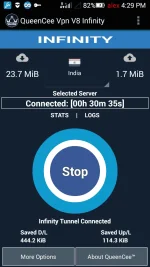
aleksgc Thank you sir for sharing your screenshot and for the positive feedback as for Sun sim network. You are most welcome too.Working Sun reg sim.
Thanks again, Ms. Queencee . . .
reyann macandog
Enthusiast
mam god eve po anu po dapat gwin pag nag oopen ng kusa ang data connection slamat po.
reyann macandogmam god eve po anu po dapat gwin pag nag oopen ng kusa ang data connection slamat po.
· Go to Settings> Connections> Data Usage then press menu button. Select Restrict Background from the menu. It will stop turning on mobile data automatically.
reyann macandog
Enthusiast
salamat po mam
mam pag nag open po ang data ko nagkakarun po ng panibagong access point names
mam unet po ng phone ko DING DING SK3 PRO
mam pag nag open po ang data ko nagkakarun po ng panibagong access point names
mam unet po ng phone ko DING DING SK3 PRO
reyann macandog I see sir, sa tingin ko mas makakabuti kung sa related na category niyo na po ipagtanong ang issue ng unit niyo po. Or look for topics here on our PHC search bar.salamat po mam
mam pag nag open po ang data ko nagkakarun po ng panibagong access point names
mam unet po ng phone ko DING DING SK3 PRO
Very useful tip. Thanks . . .reyann macandog
· Go to Settings> Connections> Data Usage then press menu button. Select Restrict Background from the menu. It will stop turning on mobile data automatically.
aleksgc ahahaha thank you sir.Very useful tip. Thanks . . .
LUDOCIEL_18
Honorary Poster
Coder15 If you are registered to any promo on your sim network, the sudden stop is just normal, sometimes it will have 3 diconnections before you can connect without disturbance. It will be better eventually, it is just a common thing for registered promos in sims with or without the use of VPNs.
·Can you check if your "Network Mode" is set to "3g Only"?There are android units that are on auto...and that you have been juggling from 3g to 2g back and forth without noticing it. This directly affects your connection since VPNs only works best with 3g.
· Your 3g should have the h+ / h or the triangles on the signal bar pointing up and down and it should be there for you to have a stable connection.if it connects then it is safe to say that there is no problem with the VPN or the Handler Settings. It is just a signal and location issue.
Ok na poCoder15 If you are registered to any promo on your sim network, the sudden stop is just normal, sometimes it will have 3 diconnections before you can connect without disturbance. It will be better eventually, it is just a common thing for registered promos in sims with or without the use of VPNs.
·Can you check if your "Network Mode" is set to "3g Only"?There are android units that are on auto...and that you have been juggling from 3g to 2g back and forth without noticing it. This directly affects your connection since VPNs only works best with 3g.
· Your 3g should have the h+ / h or the triangles on the signal bar pointing up and down and it should be there for you to have a stable connection.if it connects then it is safe to say that there is no problem with the VPN or the Handler Settings. It is just a signal and location issue.
Im using globe lte
Sobrang nkkdissapoint lht n gnwa ko wla p dn naubos n ung data ko
read page 1 data protect mo muna para di ma ubos load mo if di gumana yung trick at try new settingsIm using globe lte
Sobrang nkkdissapoint lht n gnwa ko wla p dn naubos n ung data ko

madam taga subaybay mo po aq. ung isa kong account nakalimutan q na matagal din ako hnd nakapag phc gamit ko pa din ung v7 madam wala pa din po ba proxy sa smart? pag meron madam baka pwede naman po pa pm salamat dowload ko na din tong v8 salamat ng marami
nag smart ako madam kc kala ko may viber10 ang smart lte wala pala proxy server nmn jan madam plss hnd aq mag iingay madam promise gsto q lng ng libreng net. salamat
nag smart ako madam kc kala ko may viber10 ang smart lte wala pala
proxy server nmn jan madam plss hnd aq mag iingay madam promise gsto q lng ng libreng net. salamatBlueLady19
Enthusiast
Thanks
MonsterZyr
Honorary Poster
pa pm naman po ako ng spoiler na tool. salamat
salamat again Ms Queencee
may g
may gumamit ba nito for mobile legend ?
salamat again Ms Queencee
may g
may gumamit ba nito for mobile legend ?
- Status
- Not open for further replies.
About this Thread
-
1KReplies
-
121KViews
-
766Participants
Last reply from:
Mark52
Mark52
New Topics
-
LOOKING FOR WIREGUARD SETUP IN MIKROTIK (WILLING TO PAY )
- Started by moreinformation
- Replies: 1
- 🚀 Freenet & Tunneling
-
MGa BOSS FREE VPN NA MAY PH SERVER PARA DITO SA AFRICA?
- Started by Junbiel 26
- Replies: 0
- 🚀 Freenet & Tunneling
-
PISOWIFI NO HULOG | (26-09-30) | NPV TUNNEL
- Started by Calcifeer
- Replies: 8
- 🚀 Freenet & Tunneling
-
[NOW WORKING] Youtube No Ads & Other Sites! via DNS
- Started by Lerps
- Replies: 29
- 🚀 Freenet & Tunneling
-
Free vpn can bypass captive portal
- Started by Darz2468
- Replies: 6
- 🚀 Freenet & Tunneling
-
Ano po gagawin pag ganto po?
- Started by jokejoke
- Replies: 3
- 🚀 Freenet & Tunneling
-
C pasabit pls need lang po sa edting
- Started by racetrack21
- Replies: 0
- 🚀 Freenet & Tunneling
Trending Topics
-
-
-
WIFI häçk using NodeMCU V3 ESP8266 Deauther + Evil Twin Attack (low badget 200 pesos)
- PHC H3XGAMING
Replies: 575 -
-
Multi-hop VLESS + Cloudflare WARP config (XHTTP + REALITY + TLS), privacy-focused
- Noahclanman
Replies: 4 -
-
Online now
- Members online
- 1,110
- Guests online
- 3,857
- Total visitors
- 4,967