 PH
PHAh, the joys of using a computer! Everything’s great—until a stubborn file decides to ruin your plans. That’s where Unlocker comes in, your go-to tool for dealing with files that refuse to budge.
This handy app saves the day by handling those frustrating errors like “Access is denied” or “Cannot delete folder: it’s in use.” Whether you’re tech-savvy or just a regular user, Unlocker makes it easy to delete, rename, or move locked files with just a few clicks. Say goodbye to annoying file restrictions and hello to stress-free file management!
Key Features:
Why You Need It:
We’ve all dealt with files that won’t delete or move, whether it’s leftovers from failed installs or files stuck in use by other apps. Unlocker saves you time and frustration, fixing these issues without the need to restart your computer.
Planning to organize your files or clean up your system? Keep Unlocker handy—it’s a lifesaver for those moments when an error message gets in the way.
Errors Unlocker Can Fix:
Download Link:
Download
SCREENSHOT:
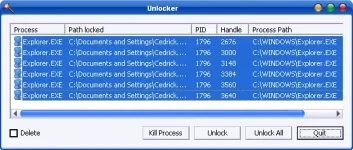
Author: You do not have permission to view the full content of this post. Log in or register now.
Date: 05/17/2013 09:34 AM
Size: 1 MB
License: Ad-Supported
Requires: Windows 11
USB LEGIT CHECKER => https://phcorner.org/threads/usb-flash-drive-legit-checker-application.2128974/
This handy app saves the day by handling those frustrating errors like “Access is denied” or “Cannot delete folder: it’s in use.” Whether you’re tech-savvy or just a regular user, Unlocker makes it easy to delete, rename, or move locked files with just a few clicks. Say goodbye to annoying file restrictions and hello to stress-free file management!
Key Features:
- Unlock Stubborn Files: Easily delete or modify files that your system says are "in use" or locked.
- Stop Problematic Processes: If an app is holding your file hostage, Unlocker can end it for you.
- Easy to Use: The simple design makes it beginner-friendly, so anyone can use it.
- Quick Access in Explorer: Right-click any locked file or folder, select Unlocker, and you’re good to go!
- Supports Many Languages: Accessible for users worldwide.
- Light and Fast: It’s small, fast, and won’t slow down your computer—even on older machines.
Why You Need It:
We’ve all dealt with files that won’t delete or move, whether it’s leftovers from failed installs or files stuck in use by other apps. Unlocker saves you time and frustration, fixing these issues without the need to restart your computer.
Planning to organize your files or clean up your system? Keep Unlocker handy—it’s a lifesaver for those moments when an error message gets in the way.
Errors Unlocker Can Fix:
- Cannot delete file: Access is denied.
- There has been a sharing violation.
- The source or destination file may be in use.
- The file is in use by another program or user.
- Make sure the disk is not full or write-protected and that the file is not currently in use.
Download Link:
Download
SCREENSHOT:
Author: You do not have permission to view the full content of this post. Log in or register now.
Date: 05/17/2013 09:34 AM
Size: 1 MB
License: Ad-Supported
Requires: Windows 11
USB LEGIT CHECKER => https://phcorner.org/threads/usb-flash-drive-legit-checker-application.2128974/