 PH
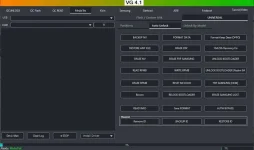
PHThe VG Tool is a powerful utility software designed for Windows, offering comprehensive solutions for managing, unlocking, and flashing various Android devices. It is compatible with a wide range of smartphones and tablets from popular brands. The tool is particularly valuable for technicians, developers, and advanced users who need to perform complex tasks on Android devices efficiently.
PW
Supported Devices
- Samsung
- Xiaomi
- Vivo
- Oppo
- Realme
- Huawei
- MediaTek devices
- Qualcomm devices
- SPD (Spreadtrum) devices
Key Features
- Unlocking FRP Locks:
- VG Tool helps in removing Factory Reset Protection (FRP) locks on supported devices, enabling users to regain access to their phones without needing the previous Google account credentials.
- Unlocking Bootloaders:
- Users can unlock the bootloader on Qualcomm-based Xiaomi devices and other supported models, allowing for custom ROM installations and other advanced modifications.
- Removing User Locks:
- The tool can bypass screen locks, patterns, passwords, PINs, and other user locks, making it easier to access devices that are otherwise restricted.
- Flashing Firmware:
- VG Tool allows users to flash firmware on Samsung, MediaTek, Qualcomm, and SPD-powered smartphones and tablets, ensuring that devices run the latest software or recover from software issues.
- Device Information:
- Provides detailed information about the connected Android device, such as model, firmware version, and hardware details.
- Mi Account Unlock:
- Helps in removing Mi Cloud accounts on Xiaomi devices, which is particularly useful when previous account information is unavailable.
- Format Data:
- Allows for the formatting of device data to resolve various software issues, ensuring that the device operates smoothly.
Compatibility
- Operating Systems: VG Tool supports Windows 7, 8, 10, and 11 (both 32-bit and 64-bit versions).
- Android Versions: Compatible with Android versions from Lollipop 5.0 to Android 13.
- Para Gumana to, need naka install yung ADB tas mga drivers ng Cellphone nyo na pag gagamitan niyo.
- Turn off Anti-Virus lang pag gagamitin niyo to, ty
Spoiler contents are visible only to Established Members.
PW
Spoiler contents are visible only to Established Members.