 PH
PH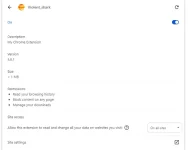
Kwento kolang ng yare sakin....
Nag hahanap ako ng Adobe ps na cráçked then trinay ko mga ibat ibang cráçked na adobe ps kadalasan hindi gumagana kaya nag iinstall then unistall ko ulit..
Makalipas ng Ilang araw parang bumabagal na pc ko, yoon pala ay na virusan hindi makita sa control panel ando lang pala sya sa may Task Manager
Ang name ng Virus ay "Violent Shark" ay isang Browser Hijacking: Ang pagbabago ng settings ng web browser, tulad ng homepage o search engine, nang hindi alam ng user, kadalasang sa pamamagitan ng malware. ninanakaw nito ang Cookies ng Account,Card info, Cloud storage info
Pano alisin?
Pano alisin ang virus?
restart your computer, then go to task manager. wait until something named "zbrain_desktop.exe" pops up and loads. right click it, and click file location. minimize the folder for abit and delete the zbrain_desktop.exe in task manager. then go back to the folder and maximize the screen, and delete everything in that folder named: " yzsx_zsync ", and if it persists to be deleted, force deletion or click keys shift+del (.) (del is on right side of keyboard.) then, go to the recycle bin and permanently ban all of those files included. if you see zsync files in your folder aswell, immediately delete those. All dll files that seem suspicious, and cannot be edited: delete all of those. if the problem repeats again, then you may have multiple folders of zbrain. if the problem happens again, you may need to have to repair your computer or device, or seek a professional
 katabi ko mama at Kapatid ko nag tawanan Sila Sabi ko na virus phone ko ayaw nila maniwala tapos binigay ko phone di nila pa off
  so umungol sya buong Araw kahit headset ayaw gumana.