 PH
PHcarmona1426
Honorary Poster
Can you fix this error when running laragon using php 5.6.40 and mysql 5.6.50?
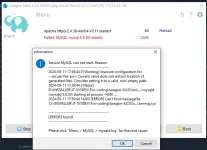
my.ini file for any misconfigurations that may be causing the issue.To fix the error you are encountering when running Laragon with PHP 5.6.40 and MySQL 5.6.50, you can try the following steps:
1. Check PHP and MySQL Versions: Ensure that Laragon is configured to use PHP 5.6.40 and MySQL 5.6.50. You can verify this by checking the Laragon configuration settings.
2. Check MySQL Service: Make sure that the MySQL service is running. You can check this by opening Laragon and looking at the status of the MySQL service. If it's not running, try starting it from the Laragon interface.
3. Check MySQL Configuration: Verify that the MySQL configuration is correct. Check themy.inifile for any misconfigurations that may be causing the issue.
4. Check Port Conflict: Ensure that there are no port conflicts with other services running on your system. MySQL typically uses port 3306, so make sure this port is not being used by another application.
5. Restart Laragon: Sometimes, simply restarting Laragon can resolve the issue. Try restarting Laragon and see if the error persists.
6. Check Firewall Settings: Check your firewall settings to ensure that Laragon and MySQL are allowed to communicate through the firewall. You may need to add exceptions for Laragon and MySQL in your firewall settings.
7. Reinstall Laragon: If none of the above steps work, you can try reinstalling Laragon to see if that resolves the issue. Make sure to back up your projects and databases before reinstalling.
By following these steps, you should be able to troubleshoot and fix the error you are encountering when running Laragon with PHP 5.6.40 and MySQL 5.6.50. If you continue to experience issues, feel free to provide more details about the error message for further assistance.
TheYou do not have permission to view the full content of this post. Log in or register now.
--secure-file-priv option in MySQL restricts the location from which you can read or write files using the LOAD DATA INFILE or SELECT ... INTO OUTFILE statements. This is a security feature to prevent unauthorized access to files on your system.--secure-file-priv in MySQL, you can resolve them by following these steps:secure_file_priv by running the following query in MySQL: SHOW VARIABLES LIKE "secure_file_priv";secure_file_priv value is set to a directory path, make sure that the directory exists and that MySQL has the necessary permissions to read from or write to that directory.secure_file_priv value, you can do so by updating the MySQL configuration file (my.cnf or my.ini) with the desired directory path. Make sure to restart MySQL after making this change.secure_file_priv restriction altogether, you can set the value to an empty string in the MySQL configuration file. However, this is not recommended for security reasons.LOAD DATA INFILE or SELECT ... INTO OUTFILE, you can grant the necessary file privileges to those users. For example: GRANT FILE ON *.* TO 'username'@'localhost';secure_file_priv value or granting file privileges, restart MySQL to apply the changes.--secure-file-priv in MySQL. Remember to consider security implications when making changes to file privileges in MySQL.