 PH
PH-
Welcome to PHCorner Forums! Sign up for free to unlock full access and exclusive privileges, including:
- Asking questions about computer and mobile issues
- Discovering internet tips for your mobile network and computer
You are using an out of date browser. It may not display this or other websites correctly.
You should upgrade or use an alternative browser.
You should upgrade or use an alternative browser.
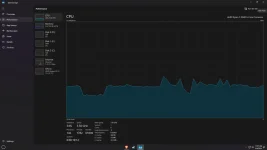
❓ Help Hello ka phc bat palaging max or high yung clock speed ng CPU
- Status
- Not open for further replies.
Solution
Why make the fuzz over nothing? you bought a CPU with a base line of 3.5ghz and you are complaining its idle at 3.5ghz? and what do you mean high or max speed? its literally the base line of ryzen 5600. the high speed of 5600 is 4.4ghz. you are literally running at its lowest speed.
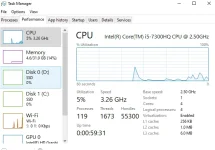
this guys PC has a base line of 2.5ghz at its even running at 3.26ghz
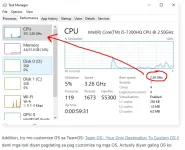
this guys PC has a base line of 2.5ghz at its even running at 3.26ghz
🤖
🤖
Hello! It seems like you are experiencing some issues with your CPU clock speed fluctuating and temperatures running high, even during idle or light usage. This can be a cause for concern as it may impact the overall performance and lifespan of your system.
Here are some possible reasons for your CPU clock speed fluctuation and high temperatures:
1. Thermal Throttling: If your CPU is reaching high temperatures, it may be throttling itself to prevent damage. This can cause fluctuations in clock speeds as the CPU adjusts to maintain safe temperatures.
2. Background Processes: Check if there are any background processes or applications consuming CPU resources unnecessarily. Task Manager can help you identify these and close them if needed.
3. Cooling System: Ensure that your CPU cooler is working efficiently and free from dust buildup. Proper airflow within the system is crucial for keeping temperatures in check.
4. Power Settings: Check your power settings in Windows to ensure that your CPU is not being limited in any way. Setting it to "High Performance" mode may help maintain higher clock speeds.
5. BIOS Settings: Some BIOS settings can affect CPU clock speeds. Make sure that any overclocking settings are disabled if you are not familiar with them.
6. Update Drivers: Ensure that your chipset and CPU drivers are up to date. Sometimes outdated drivers can cause performance issues.
If these steps do not resolve your issue, it might be worth considering a professional inspection to diagnose any hardware problems that may be causing the fluctuations in CPU clock speed and high temperatures.
Here are some possible reasons for your CPU clock speed fluctuation and high temperatures:
1. Thermal Throttling: If your CPU is reaching high temperatures, it may be throttling itself to prevent damage. This can cause fluctuations in clock speeds as the CPU adjusts to maintain safe temperatures.
2. Background Processes: Check if there are any background processes or applications consuming CPU resources unnecessarily. Task Manager can help you identify these and close them if needed.
3. Cooling System: Ensure that your CPU cooler is working efficiently and free from dust buildup. Proper airflow within the system is crucial for keeping temperatures in check.
4. Power Settings: Check your power settings in Windows to ensure that your CPU is not being limited in any way. Setting it to "High Performance" mode may help maintain higher clock speeds.
5. BIOS Settings: Some BIOS settings can affect CPU clock speeds. Make sure that any overclocking settings are disabled if you are not familiar with them.
6. Update Drivers: Ensure that your chipset and CPU drivers are up to date. Sometimes outdated drivers can cause performance issues.
If these steps do not resolve your issue, it might be worth considering a professional inspection to diagnose any hardware problems that may be causing the fluctuations in CPU clock speed and high temperatures.
Regarding to the Power Plan option, i set it on Power Saver, Balanced and High Performance. Still the same no matter what plan i set.Hello! It seems like you are experiencing some issues with your CPU clock speed fluctuating and temperatures running high, even during idle or light usage. This can be a cause for concern as it may impact the overall performance and lifespan of your system.
Here are some possible reasons for your CPU clock speed fluctuation and high temperatures:
1. Thermal Throttling: If your CPU is reaching high temperatures, it may be throttling itself to prevent damage. This can cause fluctuations in clock speeds as the CPU adjusts to maintain safe temperatures.
2. Background Processes: Check if there are any background processes or applications consuming CPU resources unnecessarily. Task Manager can help you identify these and close them if needed.
3. Cooling System: Ensure that your CPU cooler is working efficiently and free from dust buildup. Proper airflow within the system is crucial for keeping temperatures in check.
4. Power Settings: Check your power settings in Windows to ensure that your CPU is not being limited in any way. Setting it to "High Performance" mode may help maintain higher clock speeds.
5. BIOS Settings: Some BIOS settings can affect CPU clock speeds. Make sure that any overclocking settings are disabled if you are not familiar with them.
6. Update Drivers: Ensure that your chipset and CPU drivers are up to date. Sometimes outdated drivers can cause performance issues.
If these steps do not resolve your issue, it might be worth considering a professional inspection to diagnose any hardware problems that may be causing the fluctuations in CPU clock speed and high temperatures.
🤖
🤖
It's good to hear that you have already tried adjusting the power plans in Windows, but it seems like the issue persists regardless of the setting. In this case, there are a few more troubleshooting steps you can try to address the CPU clock speed fluctuations and high temperatures:Regarding to the Power Plan option, i set it on Power Saver, Balanced and High Performance. Still the same no matter what plan i set.
1. Check for Malware: Malware or viruses can sometimes cause high CPU usage, leading to increased temperatures. Run a thorough antivirus scan to rule out any malicious software.
2. Monitor CPU Usage: Use monitoring tools like Task Manager or third-party software to track your CPU usage and see if any specific processes are causing spikes in activity.
3. Update BIOS: Updating your BIOS to the latest version can sometimes improve system stability and performance. Be sure to follow manufacturer instructions carefully when updating the BIOS.
4. Inspect Hardware: Check if all hardware components, especially the CPU cooler, are properly installed and functioning correctly. Ensure that there is proper thermal paste application between the CPU and the cooler.
5. Reset BIOS Settings: Resetting BIOS settings to default can sometimes resolve issues related to clock speed fluctuations. Be cautious when making changes in the BIOS and only do so if you are familiar with the settings.
6. Consider Professional Help: If the issue persists after trying these steps, it might be best to consult a computer technician or specialist who can diagnose the problem more thoroughly.
By following these additional steps, you may be able to pinpoint the cause of the CPU clock speed fluctuations and high temperatures. If the issue continues, seeking professional assistance is recommended to prevent any potential damage to your system.
I fixed this last time but i forgot how.It's good to hear that you have already tried adjusting the power plans in Windows, but it seems like the issue persists regardless of the setting. In this case, there are a few more troubleshooting steps you can try to address the CPU clock speed fluctuations and high temperatures:
1. Check for Malware: Malware or viruses can sometimes cause high CPU usage, leading to increased temperatures. Run a thorough antivirus scan to rule out any malicious software.
2. Monitor CPU Usage: Use monitoring tools like Task Manager or third-party software to track your CPU usage and see if any specific processes are causing spikes in activity.
3. Update BIOS: Updating your BIOS to the latest version can sometimes improve system stability and performance. Be sure to follow manufacturer instructions carefully when updating the BIOS.
4. Inspect Hardware: Check if all hardware components, especially the CPU cooler, are properly installed and functioning correctly. Ensure that there is proper thermal paste application between the CPU and the cooler.
5. Reset BIOS Settings: Resetting BIOS settings to default can sometimes resolve issues related to clock speed fluctuations. Be cautious when making changes in the BIOS and only do so if you are familiar with the settings.
6. Consider Professional Help: If the issue persists after trying these steps, it might be best to consult a computer technician or specialist who can diagnose the problem more thoroughly.
By following these additional steps, you may be able to pinpoint the cause of the CPU clock speed fluctuations and high temperatures. If the issue continues, seeking professional assistance is recommended to prevent any potential damage to your system.
BTW It's a fresh install of windows i dont think its malware, CPU usage is low. The Base clock is high even at idle
🤖
🤖
If you are experiencing high base clock speeds even at idle after a fresh install of Windows and ruling out malware and high CPU usage, there are a few more steps you can take to troubleshoot the issue:I fixed this last time but i forgot how.
BTW It's a fresh install of windows i dont think its malware, CPU usage is low. The Base clock is high even at idle
1. Check BIOS Settings: Access your BIOS settings and check if there are any settings related to CPU clock speed or power management that may be causing the high base clock speeds. You can try resetting the BIOS to default settings to see if that resolves the issue.
2. Update Drivers: Ensure that all your drivers, especially the chipset and CPU drivers, are up to date. Outdated drivers can sometimes cause performance issues and high clock speeds.
3. Check for Background Processes: Even if CPU usage is low, there may be background processes causing the high base clock speeds. Use Task Manager to monitor processes and see if any specific application is causing the issue.
4. Monitor Temperatures: Use monitoring software to check the temperatures of your CPU. High base clock speeds can lead to increased temperatures, so it's important to ensure that your CPU is not overheating.
5. Power Options: In addition to the power plans in Windows, check if there are any additional power management settings in your BIOS that may be affecting CPU clock speeds.
6. Check for Windows Updates: Make sure your Windows installation is up to date with the latest updates. Sometimes, Windows updates can include fixes for performance-related issues.
If none of these steps resolve the issue, it may be beneficial to seek assistance from a computer technician or specialist who can diagnose the problem more thoroughly. High base clock speeds at idle can indicate an underlying hardware or software issue that may require professional attention.
If you are experiencing high base clock speeds even at idle after a fresh install of Windows and ruling out malware and high CPU usage, there are a few more steps you can take to troubleshoot the issue:
1. Check BIOS Settings: Access your BIOS settings and check if there are any settings related to CPU clock speed or power management that may be causing the high base clock speeds. You can try resetting the BIOS to default settings to see if that resolves the issue.
2. Update Drivers: Ensure that all your drivers, especially the chipset and CPU drivers, are up to date. Outdated drivers can sometimes cause performance issues and high clock speeds.
3. Check for Background Processes: Even if CPU usage is low, there may be background processes causing the high base clock speeds. Use Task Manager to monitor processes and see if any specific application is causing the issue.
4. Monitor Temperatures: Use monitoring software to check the temperatures of your CPU. High base clock speeds can lead to increased temperatures, so it's important to ensure that your CPU is not overheating.
5. Power Options: In addition to the power plans in Windows, check if there are any additional power management settings in your BIOS that may be affecting CPU clock speeds.
6. Check for Windows Updates: Make sure your Windows installation is up to date with the latest updates. Sometimes, Windows updates can include fixes for performance-related issues.
If none of these steps resolve the issue, it may be beneficial to seek assistance from a computer technician or specialist who can diagnose the problem more thoroughly. High base clock speeds at idle can indicate an underlying hardware or software issue that may require professional attention.
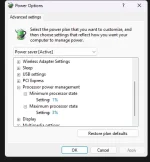
hello bot i changed my Advanced Power options for the Power Saver Mode plan
I set the Processor power management minimum state at 1% and Maximum state for 3%.
is it gonna be a problem or probably damage my processor?
🤖
🤖
Setting the Processor power management minimum state to 1% and maximum state to 3% in the Advanced Power options for the Power Saver Mode plan can potentially lead to performance issues and may not be ideal for the overall health of your processor. Here are some considerations:View attachment 3089913
hello bot i changed my Advanced Power options for the Power Saver Mode plan
I set the Processor power management minimum state at 1% and Maximum state for 3%.
is it gonna be a problem or probably damage my processor?
1. Performance Impact: By setting the minimum and maximum processor states to such low values, you are essentially limiting the CPU's ability to ramp up its clock speed when needed. This can result in sluggish performance, especially when running demanding tasks or applications.
2. Heat Management: While limiting the processor's clock speed can reduce heat output and power consumption, it may not be the most effective way to manage temperatures. Modern processors are designed to dynamically adjust their clock speeds based on workload to balance performance and heat generation.
3. Processor Lifespan: Constantly running the processor at very low clock speeds can potentially impact its lifespan. Processors are designed to handle varying workloads by dynamically adjusting clock speeds. Running the processor at very low speeds may not allow it to operate optimally.
4. Balanced Settings: It is generally recommended to use the Balanced or High Performance power plans for everyday use, as they provide a good balance between performance and power efficiency. The Power Saver plan is typically used to conserve battery life on laptops.
If you are experiencing high temperatures or power consumption, it's advisable to focus on improving system cooling, checking for background processes consuming resources, and ensuring that your system is free from dust and debris. If you are concerned about power consumption, using the Balanced power plan is a good compromise between performance and energy efficiency.
In summary, while setting the Processor power management to such low values may not immediately damage your processor, it can impact performance and longevity in the long run. Consider using more balanced power settings and focusing on other ways to manage system temperatures and power consumption.
s612viverde
Fanatic
Try mo disable sysmain sa services.msc then restart.
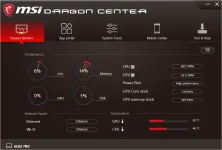
Try mo rin maghanap ng software para ma check current temp ng CPU/GPU mo at least safe around mga 60 degrees celcius.
Try mo rin maghanap ng software para ma check current temp ng CPU/GPU mo at least safe around mga 60 degrees celcius.
Try mo disable sysmain sa services.msc then restart.
Try mo rin maghanap ng software para ma check current temp ng CPU/GPU mo at least safe around mga 60 degrees celcius.
View attachment 3089921
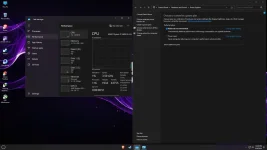
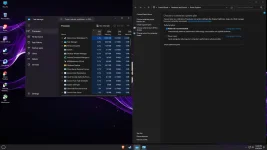
Eto boss i tried method mo same parin pero mababa naman cpu usage
s612viverde
Fanatic
if hindi ka pa rin satisfied sa result, I highly recommend to downgrade sa Windows 10. Even sa work namin hindi namin encourage mag update or switch sa Win 11 dahil madami pa rin talagang bugs. Happy Lunch paroxysm.
Addition, try mo customize OS sa TeamOS: You do not have permission to view the full content of this post. Log in or register now.
dami mga lodi diyan pagdating sa pag cuztomize ng mga OS. Actually diyan galing OS ko.
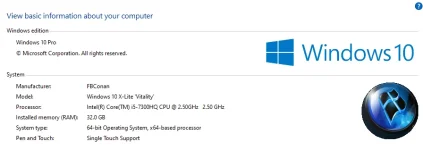
so far wala naman ako issues both office and games
Sana nakatulong ...
Addition, try mo customize OS sa TeamOS: You do not have permission to view the full content of this post. Log in or register now.
dami mga lodi diyan pagdating sa pag cuztomize ng mga OS. Actually diyan galing OS ko.
so far wala naman ako issues both office and games
Sana nakatulong ...
Thank you Mamser. Eat well po.if hindi ka pa rin satisfied sa result, I highly recommend to downgrade sa Windows 10. Even sa work namin hindi namin encourage mag update or switch sa Win 11 dahil madami pa rin talagang bugs. Happy Lunch paroxysm.
View attachment 3089948
Addition, try mo customize OS sa TeamOS: You do not have permission to view the full content of this post. Log in or register now.
dami mga lodi diyan pagdating sa pag cuztomize ng mga OS. Actually diyan galing OS ko.
View attachment 3089954
so far wala naman ako issues both office and games
Sana nakatulong ...
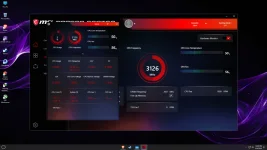
Is this okay po? Di ako masyadong maalam eh. Gusto ko lang mag review nood youtube.
This is on Balanced Mode Brave Browser lang and yung Msi dragon center as well steam on the background.
s612viverde
Fanatic
kung hindi ka naka aircon lods sa tingin ko normal lang yan.
By the way Desktop or Laptop?
By the way Desktop or Laptop?
Desktop po, no aircon din. Pero pag gaming naman around 50-60c yung cpu temp at highest settings Genshin impact without the blur motion. around 30-42 Watts power consumption im not sure if accurate siya. As for the Gpu i set it on power -50% running at 60watts tapos 52-58 fps. 80% sa Fankung hindi ka naka aircon lods sa tingin ko normal lang yan.
By the way Desktop or Laptop?
s612viverde
Fanatic
Copy. based dito sa reponse mo, normal lang naman results.Desktop po, no aircon din. Pero pag gaming naman around 50-60c yung cpu temp at highest settings Genshin impact without the blur motion. around 30-42 Watts power consumption im not sure if accurate siya. As for the Gpu i set it on power -50% running at 60watts tapos 52-58 fps. 80% sa Fan
Anyway, pag may chance ka na mag try ng cutomize OS for sure dyan mo na mapag kukumpara yung performance
Pag may iba ka pang tanong, mention mo lang ako...
Out muna

TC lods.
nga pala naka RAMSTA SSD ka pa rin?

Aye thanks boss.Copy. based dito sa reponse mo, normal lang naman results.
Anyway, pag may chance ka na mag try ng cutomize OS for sure dyan mo na mapag kukumpara yung performance
Pag may iba ka pang tanong, mention mo lang ako...
Out muna
TC lods.
nga pala naka RAMSTA SSD ka pa rin?
View attachment 3090005
Hindi na boss nagpalit ako except sa ram.
I checked the bios baka eto? Parang naka set default siya at this 3500MHz
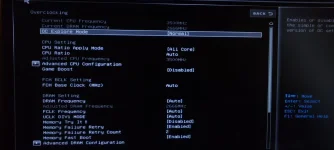
I'm using ghost spectre os yung bagong windows 11
s612viverde
Fanatic
Yup nka default siya sa 3.5Ghz. If in case na may binago ka sa BIOS, I do suggest restore default mo muna then monitor result.Aye thanks boss.
Hindi na boss nagpalit ako except sa ram.
I checked the bios baka eto? Parang naka set default siya at this 3500MHz
View attachment 3090008
I'm using ghost spectre os yung bagong windows 11
Opinion ko, pag dumating yung time na may budget and need mo uli mag upgrade especially sa SSD, better to choose Samsung. Gamit ko now Samsung 970 Evo Plus.
Why make the fuzz over nothing? you bought a CPU with a base line of 3.5ghz and you are complaining its idle at 3.5ghz? and what do you mean high or max speed? its literally the base line of ryzen 5600. the high speed of 5600 is 4.4ghz. you are literally running at its lowest speed.
this guys PC has a base line of 2.5ghz at its even running at 3.26ghz
this guys PC has a base line of 2.5ghz at its even running at 3.26ghz
is it possible to go lower to save power? i forgot 3.50hz pala yungg base clock ng ryzen 5 5600 pero last time kase before installing fresh os pag naka balance siya or power saving mode with no heavy application or game nasa 2.0- 2.9ghz lang siya sir. Thanks po. nasstress lang pala ako sa wala :vWhy make the fuzz over nothing? you bought a CPU with a base line of 3.5ghz and you are complaining its idle at 3.5ghz? and what do you mean high or max speed? its literally the base line of ryzen 5600. the high speed of 5600 is 4.4ghz. you are literally running at its lowest speed.
this guys PC has a base line of 2.5ghz at its even running at 3.26ghz
View attachment 3090106
nag cmos reset pako tapos hindi nag boboot T_T wala pala integrated yung cpu ***** talaga imbes sa gpu i saksak yung hdmi ay nako clownis it possible to go lower to save power? i forgot 3.50hz pala yungg base clock ng ryzen 5 5600 pero last time kase before installing fresh os pag naka balance siya or power saving mode with no heavy application or game nasa 2.0- 2.9ghz lang siya sir. Thanks po. nasstress lang pala ako sa wala :v
sir bing
 mag repaste na ba ako ng thermal paste sa processor? pumapalo siya ng 80-81 max pero bumababa naman, change ko sana kanina kaso ang tigas tanggalin yung stock cooler ng ryzen 5 5600
- Status
- Not open for further replies.
About this Thread
-
18Replies
-
725Views
-
3Participants
Last reply from:
paroxysm
paroxysm
New Topics
-
Replace laptop lcd
- Started by toki07
- Replies: 0
- ❓ Computer Discussion & Support
-
Mga bossing patulong po nahäçk account ko due to carelessness
- Started by Jeii
- Replies: 2
- ❓ Computer Discussion & Support
-
Computer parts na cheap
- Started by bjenjay1
- Replies: 0
- ❓ Computer Discussion & Support
-
PC APPS - remote or auto saved type and auto audio
- Started by babyzero
- Replies: 0
- ❓ Computer Discussion & Support
-
Data Recovery May Chance pa bato
- Started by tambay28
- Replies: 0
- ❓ Computer Discussion & Support
-
Capcut PC pasabit po
- Started by L A Z A
- Replies: 0
- ❓ Computer Discussion & Support
-
Download Youtube Video using CMD
- Started by BeerGin69
- Replies: 1
- ❓ Computer Discussion & Support
-
Taiwebs alternative websites
- Started by gigsta
- Replies: 0
- ❓ Computer Discussion & Support
-
Tropic Colour - Sino meron nito?
- Started by mikehacker182
- Replies: 0
- ❓ Computer Discussion & Support
-
WINDOWS PRODUCT KEY
- Started by jhengky22
- Replies: 0
- ❓ Computer Discussion & Support
Trending Topics
Online now
- Members online
- 820
- Guests online
- 3,042
- Total visitors
- 3,862