 PH
PH-
Welcome to PHCorner Forums! Sign up for free to unlock full access and exclusive privileges, including:
- Asking questions about computer and mobile issues
- Discovering internet tips for your mobile network and computer
You are using an out of date browser. It may not display this or other websites correctly.
You should upgrade or use an alternative browser.
You should upgrade or use an alternative browser.
❓ Help Sa mga tech ng laptop, pasok
🤖
🤖
Hello! It seems like you are experiencing a keyboard issue where multiple letters are being registered when you press the letter 'C'. Here are some steps you can try to troubleshoot and hopefully fix the problem:
1. Check for Physical Debris: Sometimes, dust or debris can get stuck under the keys and cause them to register incorrectly. Try gently cleaning the area around the 'C' key using a can of compressed air or a soft brush.
2. Restart Your Laptop: A simple restart can sometimes resolve minor software issues causing keyboard problems. Restart your laptop and check if the issue persists.
3. Update or Reinstall Keyboard Drivers: Outdated or corrupted keyboard drivers can lead to malfunctioning keys. You can update the drivers through Device Manager in Windows or reinstall them from the laptop manufacturer's website.
4. Check for Stuck Keys: Make sure the 'C' key is not physically stuck in a pressed position. Gently press the key a few times to see if it pops back up.
5. Test with External Keyboard: If the issue continues, try connecting an external USB keyboard to your laptop and check if the problem persists. If the external keyboard works fine, it might indicate a hardware issue with your laptop's built-in keyboard.
6. Reset Keyboard Settings: You can try resetting the keyboard settings to default in your laptop's settings or control panel.
7. Contact Technical Support: If none of the above solutions work, it's best to reach out to the laptop manufacturer's technical support for further assistance. They may recommend repairs or replacement if the keyboard is faulty.
I hope one of these steps helps resolve the issue with your 'C' key! Let me know if you need further assistance.
1. Check for Physical Debris: Sometimes, dust or debris can get stuck under the keys and cause them to register incorrectly. Try gently cleaning the area around the 'C' key using a can of compressed air or a soft brush.
2. Restart Your Laptop: A simple restart can sometimes resolve minor software issues causing keyboard problems. Restart your laptop and check if the issue persists.
3. Update or Reinstall Keyboard Drivers: Outdated or corrupted keyboard drivers can lead to malfunctioning keys. You can update the drivers through Device Manager in Windows or reinstall them from the laptop manufacturer's website.
4. Check for Stuck Keys: Make sure the 'C' key is not physically stuck in a pressed position. Gently press the key a few times to see if it pops back up.
5. Test with External Keyboard: If the issue continues, try connecting an external USB keyboard to your laptop and check if the problem persists. If the external keyboard works fine, it might indicate a hardware issue with your laptop's built-in keyboard.
6. Reset Keyboard Settings: You can try resetting the keyboard settings to default in your laptop's settings or control panel.
7. Contact Technical Support: If none of the above solutions work, it's best to reach out to the laptop manufacturer's technical support for further assistance. They may recommend repairs or replacement if the keyboard is faulty.
I hope one of these steps helps resolve the issue with your 'C' key! Let me know if you need further assistance.
paano po hanapin Ang keyboard mappinggamitan mo ng keyboard mapper bossing para malaman mo anu anu ang nag-o-auto press
try mo lang muna yung on-screen keyboard bossing bago ka gumamit ng third partypaano po hanapin Ang keyboard mapping
Hindi po sir e, E at C lang may problematry mo lang muna yung on-screen keyboard bossing bago ka gumamit ng third party
Hindi po sir e, E at C lang may problema
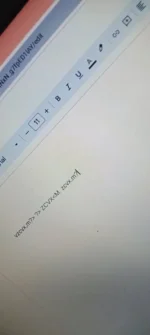
ito po lumalabas, Everytime na pinipindot ko Ang letter E at C
akala mo lang yan bossing, hayaan mo ang mapper mismo yung magsabi sayo kung anung keys, the mapper has more access to the keyboard as compared diyan sa observation mo langHindi po sir e, E at C lang may problema
View attachment 3086307
ito po lumalabas, Everytime na pinipindot ko Ang letter E at C
paano po mag mapper,akala mo lang yan bossing, hayaan mo ang mapper mismo yung magsabi sayo kung anung keys, the mapper has more access to the keyboard as compared diyan sa observation mo lang
PHC - Raijin-X
꧁𓊈𒆜° ꒓ꆂꁹ-ꏝꂑ꒒ °𒆜𓊉꧂
Try Here!!! ~~~> You do not have permission to view the full content of this post.
Log in or register now.
Similar threads
-
❓ Help Patulong po sa mga Tech , about CP
- Started by Engiyearner
- Replies: 2
-
❓ Help Napaka LAG ng laptop, patulong if ayos lang.
- Started by M A R I M 0
- Replies: 7
About this Thread
-
10Replies
-
646Views
-
5Participants
Last reply from:
PHC - Raijin-X
PHC - Raijin-X
New Topics
-
Salamat SONGHUB sa idea
- Started by luffyg
- Replies: 3
- 💬 Chitchat
-
RCBC acct ko, pinang scam dito galing.
- Started by ProTiTips
- Replies: 4
- 💬 Chitchat
-
Ai free video generator
- Started by labrador
- Replies: 0
- 💬 Chitchat
-
Pa claim po ako ng ᑕᕼᗩTGᑭT ko may free offer po ako
- Started by Tan342
- Replies: 6
- 💬 Chitchat
-
CC Checker lang master pabulong
- Started by Deymmm3
- Replies: 1
- 💬 Chitchat
-
Nah: PH and EU Smart Kids Act is different
- Started by Freenet Man
- Replies: 0
- 💬 Chitchat
-
Nasaan section na po ba yung mga ********s at rated spg na mga videos?
- Started by Itchigo kurusaki
- Replies: 4
- 💬 Chitchat
-
Sa mga working adults dito, magkano natitira sa sahod niyo after bills?
- Started by StevenRogers
- Replies: 7
- 💬 Chitchat
Trending Topics
Online now
- Members online
- 1,356
- Guests online
- 3,884
- Total visitors
- 5,240