 PH
PHSilent Agony
Fanatic
So, May binili akong motherboard (asus a58m-e r2.0) yung tinest ko na ayaw maagpakita ng HDD ko, CSM Error lang,
Gantong error nalabas
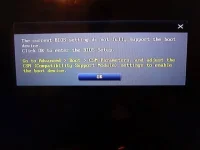
Enable/Disable/Auto same lang, nababaliw nako..
Brief History; Nag maintenance ako nang desktop ko (usual na cleaning) accidentally ko na nahampas yung case habang nakapatong sa lap ko (Di ko pa sya pinapatay kase may duda ako kung naikot ba yung mga fan sa loob di kase kita) namatay yung psu bigla tapos ayaw na mag boot so bumili ako ng bagong psu, turns out dead din yung motherboard, eto pinalitan ko nanga tapos ayaw ma detect yung HDD boot drive ko.. dead nadin kaya? Just for the record.. nainit naman yung PCB ng HDD pero parang hindi naikot di ko marinig or feel.. by the way 04-- etc yung bios version, outdated sya.. 2011 yung time napinapakita nya tapos yung HDD ko naman 2015 ata... WD5000aakx.
Gantong error nalabas
Enable/Disable/Auto same lang, nababaliw nako..
Brief History; Nag maintenance ako nang desktop ko (usual na cleaning) accidentally ko na nahampas yung case habang nakapatong sa lap ko (Di ko pa sya pinapatay kase may duda ako kung naikot ba yung mga fan sa loob di kase kita) namatay yung psu bigla tapos ayaw na mag boot so bumili ako ng bagong psu, turns out dead din yung motherboard, eto pinalitan ko nanga tapos ayaw ma detect yung HDD boot drive ko.. dead nadin kaya? Just for the record.. nainit naman yung PCB ng HDD pero parang hindi naikot
di ko marinig or feel.. by the way 04-- etc yung bios version, outdated sya.. 2011 yung time napinapakita nya tapos yung HDD ko naman 2015 ata... WD5000aakx.