 PH
PHWhat do we need ?
# A PC with internet connection.
# Java (Latest Version).Get it from You do not have permission to view the full content of this post. Log in or register now.
# A tunneling software,we will use You do not have permission to view the full content of this post. Log in or register now.You are more than welcome to use your creativity
# Brains and Patience.
How To Do It ?
First of all download the setup files for "Your Freedom Client" and "Java",don't install them yet.Now go to "Your freedom clientYou do not have permission to view the full content of this post. Log in or register now. and register a new account,Use fake info for all the fields except country,For fake email address go to,my You do not have permission to view the full content of this post. Log in or register now. fake email site..Note down the username and passwords for your freedom client,we will use them later.
Now install java, disconnect your internet then install your freedom client (tunneling software).
Install the client with default settings.
SKIP the wizard that comes up after the installation.
How To Use It ?
Setting it up -
1 -You will see a Your Freedom Open window. Click on “Configure -
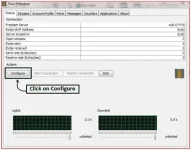
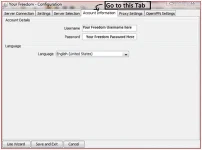
2 - Go to “Account Information" tab. Enter your “Your Freedom” Username and Password .Not : 1 account of "Your Freedom" works for only 3 hours a day,thats why i told you to make multiple fake accounts. -
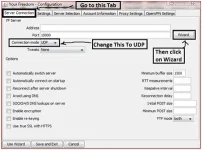
3 -Then go to the “Server Connection” tab. Select “Connection Mode” as “UDP”. Then click on the "Wizard".
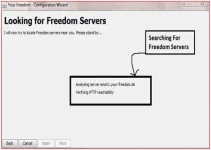
4 - Now this wizard will search for all the servers available and show the by a priority list,The ones on top means they are best for you.
5 - When the wizard completes, it will show many servers which can be used for proxy tunneling. Choosing the first server is recommended. The first server has the maximum speed and acuracy. Then click on “Finish”. Then click on “Save and Exit”.
6 - Click (right) on the Your Freedom Icon (the closed door) on the "Notification Area" and click on “Start Connection”. Your proxy connection will be started.
#Use Internet Explorer (omg) ?
For internet explorer you have to change the settings,Go To -> Menu Bar go to Tools >> Internet Options >> Connections Tab >> LAN Settings. Set proxy address as "localhost" (without ") and port 8080. You need to configure the same even if you are using any other browser. Press OK and Start Browsing.. But remember, every time you start your computer, Start Freedom Connection from Notification area and then only start the internet. Otherwise the bytes will be counted.
#Warning -
This trick is only tunneling,and if your isp is smart it will detect it or would have already detected it,Use CAUTION.i would not be held responsible for any shit.Works on 70% of the ISP.
# A PC with internet connection.
# Java (Latest Version).Get it from You do not have permission to view the full content of this post. Log in or register now.
# A tunneling software,we will use You do not have permission to view the full content of this post. Log in or register now.You are more than welcome to use your creativity
# Brains and Patience.
How To Do It ?
First of all download the setup files for "Your Freedom Client" and "Java",don't install them yet.Now go to "Your freedom clientYou do not have permission to view the full content of this post. Log in or register now. and register a new account,Use fake info for all the fields except country,For fake email address go to,my You do not have permission to view the full content of this post. Log in or register now. fake email site..Note down the username and passwords for your freedom client,we will use them later.
Now install java, disconnect your internet then install your freedom client (tunneling software).
Install the client with default settings.
SKIP the wizard that comes up after the installation.
How To Use It ?
Setting it up -
1 -You will see a Your Freedom Open window. Click on “Configure -
2 - Go to “Account Information" tab. Enter your “Your Freedom” Username and Password .Not : 1 account of "Your Freedom" works for only 3 hours a day,thats why i told you to make multiple fake accounts. -
3 -Then go to the “Server Connection” tab. Select “Connection Mode” as “UDP”. Then click on the "Wizard".
4 - Now this wizard will search for all the servers available and show the by a priority list,The ones on top means they are best for you.
5 - When the wizard completes, it will show many servers which can be used for proxy tunneling. Choosing the first server is recommended. The first server has the maximum speed and acuracy. Then click on “Finish”. Then click on “Save and Exit”.
6 - Click (right) on the Your Freedom Icon (the closed door) on the "Notification Area" and click on “Start Connection”. Your proxy connection will be started.
#Use Internet Explorer (omg) ?
For internet explorer you have to change the settings,Go To -> Menu Bar go to Tools >> Internet Options >> Connections Tab >> LAN Settings. Set proxy address as "localhost" (without ") and port 8080. You need to configure the same even if you are using any other browser. Press OK and Start Browsing.. But remember, every time you start your computer, Start Freedom Connection from Notification area and then only start the internet. Otherwise the bytes will be counted.
#Warning -
This trick is only tunneling,and if your isp is smart it will detect it or would have already detected it,Use CAUTION.i would not be held responsible for any shit.Works on 70% of the ISP.


