 PH
PHPHC_HARLEY QUINN
Eternal Poster
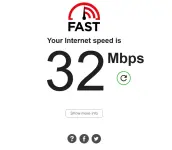
This will only work on disconnected PLDT Fiber connections that still have a yellow internet light on the modem! The service is restricted, but still connected to the NAP box.
STEPS:
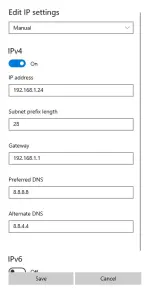
- Edit IP Settings:
- Scroll down to find IP assignment. It likely says "Automatic (DHCP)".
- Click the Edit button.
- Change "Automatic (DHCP)" to Manual.
- Toggle IPv4 to "On".
- Enter the Details (from your image):
- IP address: 192.168.1.2 - 192.168.1.100
- Subnet mask: The image uses a "Prefix length" of 28. In Windows, if it asks for a "Subnet mask," the equivalent is 255.255.255.240. If it asks for "Subnet prefix length," enter 28.
- Gateway: 192.168.1.1
- Preferred DNS: 8.8.8.8
- Alternate DNS: 8.8.4.4
- Click Save.
1. Download
- Go to the official GitHub repository: You do not have permission to view the full content of this post. Log in or register now..
- Download the file named v2rayN-Core.zip (usually under the "Assets" section of the latest release). This version includes the necessary core files.
- Right-click the downloaded zip file and select Extract All to unzip it.
- Open the extracted folder and double-click v2rayN.exe (it has a blue V icon).
- Copy your vless:// configuration text from your source.
- Open V2RayN.
- Click anywhere in the white server list area (or press Ctrl + V).
- Alternatively, click the Servers menu at the top -> Import bulk URL from clipboard.
- The server should appear in the list. Right-click it and select Set as active server (it will turn blue/active).
- Look at the bottom of the window for System Proxy. Change it from "Clear" to Set System Proxy.
Part 2: Android - Using EV2RAY or v2rayNG
Since you specifically mentioned EV2RAY, you likely mean the app by "ePro Dev Team," but v2rayNG is the standard and most reliable client. Both work similarly.1. Download
- Option A (EV2RAY): Search for "e-V2ray" in the Google Play Store and install it.
- Option B (v2rayNG - Recommended): Search for "v2rayNG" in the Google Play Store and install it.
- Copy your vless:// configuration text on your phone.
- Open the app.
- Tap the Plus (+) icon (usually at the top right).
- Select Import config from Clipboard.
- Select the configuration you just imported (tap it to select).
- Tap the huge V (Connect) button at the bottom.
- If it asks for "Connection Request" permission, tap OK.
Summary of the "Trick"
For the setup you described (Static IP + Restricted PLDT connection) to work:- Connect to Wi-Fi: Ensure your device is using the Static IP settings you configured in the previous step (192.168.1.24).
- Open V2Ray: Launch the app (V2RayN or app on phone).
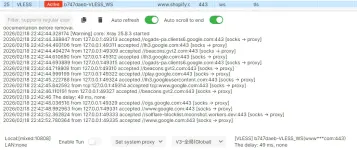
- Connect: Start the V2Ray connection. The V2Ray client attempts to tunnel through the restricted network using the specific SNI/Bug Host in your config.
Config (own server will last one month dm if you want method and script):
vless://b747daeb-5633-46bf-8d59-8deae629959f@www.shopify.com:443?encryption=none&security=tls&sni=bypass-harley.me&fp=chrome&type=ws&host=bypass-harley.me&path=%2Ffxhhws#b747daeb-VLESS_WS
Good luck and enjoy!
