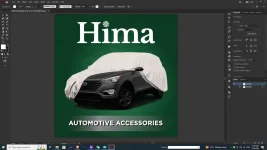
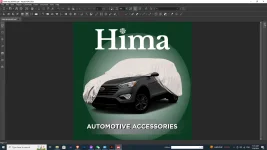
Hello! It seems like you are facing an issue with saving your CMYK file with Gaussian blur effects as a PDF for printing. The problem you are encountering might be related to how the Gaussian blur effect is being interpreted during the PDF export process. Here are a few things you can check and try to resolve the issue:
1. Document Color Mode: Make sure that your Illustrator document is set to CMYK color mode before saving it as a PDF for printing. This ensures that the colors are accurately represented for the printing process.
2. Raster Effects Settings: Check the raster effects settings in Illustrator before exporting to PDF. Go to Effect > Document Raster Effects Settings and ensure that the resolution is set to High (300 ppi) or above. This can help maintain the quality of effects like Gaussian blur during the PDF export.
3. Transparency Flattening: Sometimes, complex transparency effects like Gaussian blur can cause issues during PDF export. Try flattening transparency before saving as a PDF. You can do this by going to Object > Flatten Transparency and adjusting the settings accordingly.
4. PDF Export Settings: When saving as a PDF, make sure to select the appropriate settings for your printing requirements. In the PDF export dialog, check the compression settings, color conversion, and compatibility options to ensure they are suitable for high-quality printing output.
5. Test with Different File Formats: If the issue persists, you can also try exporting your file in a different format (such as EPS) and then converting it to PDF using a different method or software to see if the output improves.
If you have tried these suggestions and are still facing the issue, please provide more details about your Illustrator version, the specific settings you are using for PDF export, and any other relevant information so that we can assist you further.
 PH
PH