 PH
PHCinematic superpowers. Ultra smooth. Sharp. Steady.
Topaz Video AI focuses solely on completing a few video enhancement tasks really well: deinterlacing, upscaling, and motion interpolation.We've taken five years to craft AI models robust enough for natural results on real-world footage.
Ultra Sharp: Upscale to 16K and fix compression artifacts.
There are several major changes that we’re excited to announce1. Instant Rendering (Experimental)
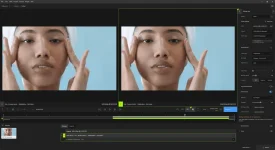
Video AI now renders previews as soon as you click "Play".
Instant renders make the timeline more interactive
and allow you to directly compare models with shorter wait times.
2. Frame Interpolation for DaVinci Resolve OFX (macOS + Windows)
Access Apollo, Aion, and Chronos directly from DaVinci Resolve.
Convert to slow motion at up to 16x interpolation
and make use of Resolve’s retiming controls for smooth speed-ramping.
To use Frame Interpolation in Resolve.
3. New multi-GPU options (Video AI Pro)
Video AI now includes two multi-GPU modes.
The existing "All GPUs" option now supports NVIDIA cards running TensorRT models,
leading to major utilization increases for systems with 2+ NVIDIA cards.
This mode is now named "Single video" under "GPU Settings".
The second mode, "Multiple videos", optimizes for large export queues
when running on systems with multiple GPUs.
We’ll have more to share about this Video AI Pro feature when it launches in June.
4. New Welcome Screen
Quickly reopen projects and resume renders using the new Welcome Page.
This is a home for recent projects and includes the ability to select favorites for easy access.
5. Preferences UI Refresh
Navigate settings using the new preferences sidebar with expanded categories and new tooltips.
6. Colorspace settings added to Video Input Options
Set custom colorspace, color primaries, color trc, and color range for video inputs with metadata issues.
System requirements
Minimum RequirementsWindows Operating System
10 or 11 (most updated version recommended)
CPU
Intel with AVX2 instructions OR AMD with AVX2 instructions
System Memory (RAM)
16 GB (32 GB or more recommended)
Graphics Card (NVIDIA)
NVIDIA GTX 900 or higher, 4GB VRAM
Graphics Card (AMD)
AMD Radeon 400 or higher, 4GB VRAM
Graphics Card (Intel)
Intel UHD 600 Graphics or higher. 12GB RAM
CPU Release Year
2016 or newer
Recommended Specifications
System Memory (RAM)
32 GB or more
Graphics Card (NVIDIA)
NVIDIA RTX 3000 or higher, 8GB VRAM
Graphics Card (AMD)
AMD Radeon 400 or higher, 8GB VRAM

download link
You do not have permission to view the full content of this post. Log in or register now.