 PH
PHMamamooooo
Forum Contributor
Download Link:
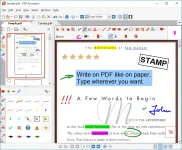
PDF Annotator lets the user open any PDF file and add annotations, using the mouse or a Tablet PC pen, directly on the PDF file's pages. The annotated documents can then be saved directly back to PDF format. In this way, anyone can read or print the annotated PDF documents. Annotated documents can also be easily attached to emails.
Previously, annotating, commenting or proofreading a document received for review in PDF file format was possible only by using multiple software products in a row--or only by printing the document and adding comments manually. With PDF Annotator, annotations can also be added in a natural way--using a pen--but everything remains in digital format. PDF Annotator allows commenting of PDF files in a single step.
Annotation Manager in the Sidebar
- Get a quick overview of all annotations in a document.
- Navigate to any annotations quickly.
- Perform operations on any selection of annotations.
Filter Annotations
- Only display a filtered subset of your annotations in the new Annotations sidebar.
- Filter by type, color, or page number.
Print Annotations Overviews
- Print a detailed list with small previews of every single annotation in a document.
- Print an overview only outlining the pages containing annotations.