 PH
PHIrresistibleMiggy
Eternal Poster
Let's start!
How To Use aNmap:
1. Download You do not have permission to view the full content of this post. Log in or register now.
2. Install it on your device.
3. Run it. You will see a window like this:
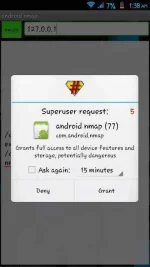
4. Grant root access, then you will see the main page of aNmap:
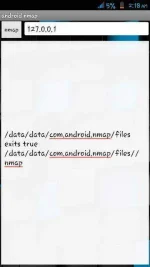
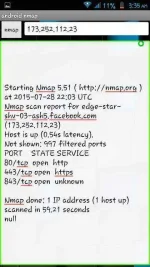
5. Now you can use all the features of aNmap. Enter the IP address of the target in the top-right box. Then tap on "nmap" button. It will start scanning the target server and display the open ports and other characteristics (see the image below -- scanning results of Facebook.com):
If you don't know how to find the IP address of a particular website, don't worry, I will show you how. First, open the command prompt and then type "tracert" without quotes. Then enter the address of the website and hit the enter key, you will see something like this:
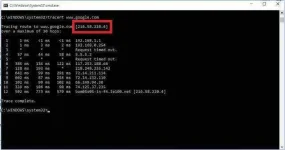
You can find the IP address of the website next to where it says "Tracing route to <the website>".
Alternate Method For Finding IP Address of Websites:
1. Go to You do not have permission to view the full content of this post. Log in or register now., you will see a page like the below one:
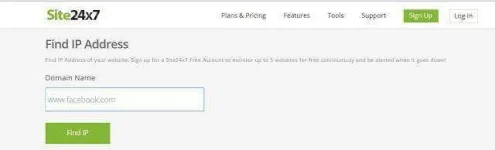
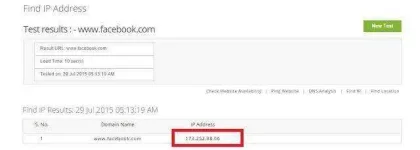
2. Enter the address of the website in the "Domain Name" box, then click on "Find IP" button. You will see the IP address of that domain (see the image below):
Other online services for website IP address lookup:
How To Use aNmap:
1. Download You do not have permission to view the full content of this post. Log in or register now.
2. Install it on your device.
3. Run it. You will see a window like this:
4. Grant root access, then you will see the main page of aNmap:
5. Now you can use all the features of aNmap. Enter the IP address of the target in the top-right box. Then tap on "nmap" button. It will start scanning the target server and display the open ports and other characteristics (see the image below -- scanning results of Facebook.com):
If you don't know how to find the IP address of a particular website, don't worry, I will show you how. First, open the command prompt and then type "tracert" without quotes. Then enter the address of the website and hit the enter key, you will see something like this:
You can find the IP address of the website next to where it says "Tracing route to <the website>".
Alternate Method For Finding IP Address of Websites:
1. Go to You do not have permission to view the full content of this post. Log in or register now., you will see a page like the below one:
2. Enter the address of the website in the "Domain Name" box, then click on "Find IP" button. You will see the IP address of that domain (see the image below):
Other online services for website IP address lookup:
- You do not have permission to view the full content of this post. Log in or register now.
- You do not have permission to view the full content of this post. Log in or register now.
- You do not have permission to view the full content of this post. Log in or register now.
- You do not have permission to view the full content of this post. Log in or register now.
- You do not have permission to view the full content of this post. Log in or register now.
- You do not have permission to view the full content of this post. Log in or register now.
- You do not have permission to view the full content of this post. Log in or register now.