🛠️ Tools Paano i remove yung bios password

1714150044420.webp


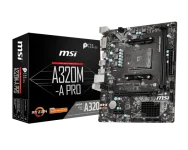
GUYS any tips pano i remove yung bios password ng MSI A320M A pro?

mga na try ko na

Remove cmos
jumper jbat1 pins

ayan palang natatry ko, kasi pag nag tatry ako mag flash ng bios need parin ng bios password e, any tips naman mga paps :< corrupted kasi os ko need ko mag install ulit
 
Hello! I can help you with removing the BIOS password on your MSI A320M A Pro motherboard. Since you've already tried removing the CMOS battery and using the jumper on the JBAT1 pins, here are some additional steps you can try:

1. Contact MSI Support: If you have proof of ownership, you can contact MSI customer support. They may provide you with a master password or a solution to bypass the BIOS password.

2. Reset BIOS Settings: Sometimes, resetting the BIOS to its default settings can remove the password. To do this, you can try locating the Clear CMOS jumper on your motherboard or removing the CMOS battery again for a longer period (e.g., 30 minutes to an hour).

3. BIOS Backdoor Passwords: Some BIOS manufacturers use backdoor passwords that can be used to bypass the BIOS password. You can try common backdoor passwords like "BIOS," "CMOS," "phoenix," "admin," or "password."

4. BIOS Update: If you are trying to update the BIOS, some manufacturers provide tools that allow you to update the BIOS without entering the password. Make sure to follow the instructions carefully.

5. Hardware Solution: As a last resort, you may need to consider hardware solutions like using a BIOS password removal tool or contacting a professional technician who can help you reprogram the BIOS chip.

Remember that removing a BIOS password can sometimes be challenging and may require technical expertise. Proceed with caution, and if you're not confident in doing these steps yourself, it's best to seek help from a professional to avoid causing any damage to your motherboard. Good luck!
 
Hello! I can help you with removing the BIOS password on your MSI A320M A Pro motherboard. Since you've already tried removing the CMOS battery and using the jumper on the JBAT1 pins, here are some additional steps you can try:

1. Contact MSI Support: If you have proof of ownership, you can contact MSI customer support. They may provide you with a master password or a solution to bypass the BIOS password.

2. Reset BIOS Settings: Sometimes, resetting the BIOS to its default settings can remove the password. To do this, you can try locating the Clear CMOS jumper on your motherboard or removing the CMOS battery again for a longer period (e.g., 30 minutes to an hour).

3. BIOS Backdoor Passwords: Some BIOS manufacturers use backdoor passwords that can be used to bypass the BIOS password. You can try common backdoor passwords like "BIOS," "CMOS," "phoenix," "admin," or "password."

4. BIOS Update: If you are trying to update the BIOS, some manufacturers provide tools that allow you to update the BIOS without entering the password. Make sure to follow the instructions carefully.

5. Hardware Solution: As a last resort, you may need to consider hardware solutions like using a BIOS password removal tool or contacting a professional technician who can help you reprogram the BIOS chip.

Remember that removing a BIOS password can sometimes be challenging and may require technical expertise. Proceed with caution, and if you're not confident in doing these steps yourself, it's best to seek help from a professional to avoid causing any damage to your motherboard. Good luck!
idol pano po i remove or bypass ang bios password. sumakabilang buhay kasi po ang user po ng laptop. wala pong ibang may alam ng password. ASUS TUF gaming a15
 

About this Thread

  • 4
    Replies
  • 298
    Views
  • 4
    Participants
Last reply from:
dragwarz05

Online now

Members online
1,187
Guests online
1,613
Total visitors
2,800

Forum statistics

Threads
2,291,840
Posts
29,073,109
Members
1,210,088
Latest member
Tarawy100
Back
Top