PH
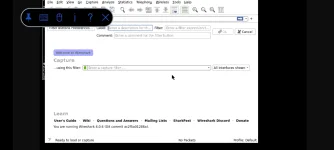
PHWireshark Android-is a very popular network packet analyzer application.With the help of Wireshark Android, you can observe what is happening to your network to a basic level., beside that Wireshark is commonly used for network troubleshooting, packet analyzing, etc..
With the help of this tool, you can capture and analyze network packet in real time. Wireshark is the most considered tool by Ethical häçkers.
Installation Procedure.(Just copy and paste the commands)
1.)
2.)
3.)
★This might take for a while so your patience is needed here.
4.)
5.) apt
6.)
Now,we have to configure tigervnc,inorder to do that,type;
If it is your first using this command,it will ask you a VNC password.You can enter password you want as long as you can remember it because you will use it later.
The command above will display the GUI application.
Now,we have to download install a VNC viewer remote desktop application for android which will help us to run Wireshark in GUI mode.
You do not have permission to view the full content of this post. Log in or register now.
Application Image:

After succesfully installing the VNC Viewer,open the application and click on the + sign.You will see something like this in the below image;
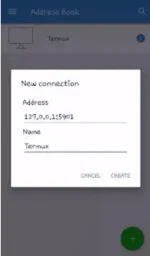
On the Address Field add:
On the Name Field,you can add any name you want.
Then click Create. You will then be prompted to add the password that you create in VNC Viewer.
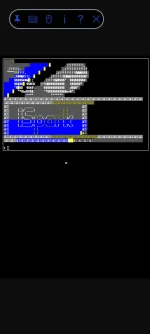
You are now successfully connected.You will see the terminal in VNC Viewer.
To run the Wireshark,move the pointer into the VNC Viewer terminal and type;
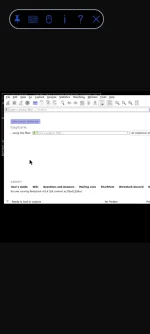
★Command to display Wireshark GUI
That's it,you are now running the Wireshark in VNC Viewer.
To exit VNC Viewer,just press the X right next the question mark.
To run again the Wireshark,type;
followed by,
and lastly, open the VNC Viewer application and type;
NOTE: Use this tool for Educational Purpose only.
WARNING: Do not use this tool in îllégâl activities. You have been warned!!
Feedback kung hindi nagana sa inyo and huwag mag hit and run lang para maiguide ko kayo if may mali sa installation nyo.
With the help of this tool, you can capture and analyze network packet in real time. Wireshark is the most considered tool by Ethical häçkers.
Installation Procedure.(Just copy and paste the commands)
1.)
apt update && apt upgrade -y2.)
pkg install x11-repo3.)
apt install wireshark-gtk★This might take for a while so your patience is needed here.
4.)
pkg install xterm5.) apt
install tigervnc6.)
apt install tigervnc-viewerNow,we have to configure tigervnc,inorder to do that,type;
vncserverIf it is your first using this command,it will ask you a VNC password.You can enter password you want as long as you can remember it because you will use it later.
export DISPLAY=":1"The command above will display the GUI application.
Now,we have to download install a VNC viewer remote desktop application for android which will help us to run Wireshark in GUI mode.
You do not have permission to view the full content of this post. Log in or register now.
Application Image:
After succesfully installing the VNC Viewer,open the application and click on the + sign.You will see something like this in the below image;
On the Address Field add:
127.0.0.1:5901On the Name Field,you can add any name you want.
Then click Create. You will then be prompted to add the password that you create in VNC Viewer.
You are now successfully connected.You will see the terminal in VNC Viewer.
To run the Wireshark,move the pointer into the VNC Viewer terminal and type;
wireshark -ql★Command to display Wireshark GUI
wireshark --fullscreenThat's it,you are now running the Wireshark in VNC Viewer.
To exit VNC Viewer,just press the X right next the question mark.
To run again the Wireshark,type;
vncserverfollowed by,
export DISPLAY=":1"and lastly, open the VNC Viewer application and type;
wireshark -qlNOTE: Use this tool for Educational Purpose only.
WARNING: Do not use this tool in îllégâl activities. You have been warned!!
Feedback kung hindi nagana sa inyo and huwag mag hit and run lang para maiguide ko kayo if may mali sa installation nyo.