 PH
PHIn this tutorial, I will teach you on how to setup ControlD DNS using only a resolver ID without any IP configuration.
And it should bypass the smart unlidata speedcap on google based sites.
Also block all the ads in your browsers.
And it should bypass the smart unlidata speedcap on google based sites.
Also block all the ads in your browsers.
1st step:
Download this file.
You do not have permission to view the full content of this post. Log in or register now.
2nd step:
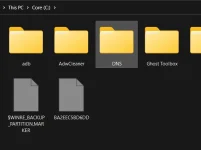
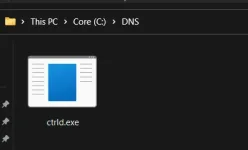
Create a folder named "DNS" in your C: drive and drop the downloaded file in that folder
3rd step:
Open the command prompt and run it as Admin then paste the following commands
Code:
cd C:\DNS
ctrld.exe start --cd 1126h2p71a9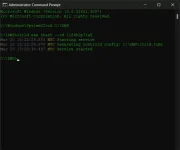
4th step:
When you see "service started" in the command prompt. It should be done.
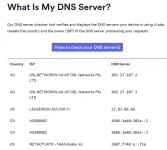
To test, go to this link You do not have permission to view the full content of this post. Log in or register now.
Your DNS should look like this or similar.
Every time you restart your Windows PC, the program will also start and you don't need to do all this all over again.
If you want to stop the program, paste the following commands in your command prompt.
Code:
cd C:\DNS
ctrld.exe stop
Or if you want to completely remove it and use another DNS. Paste these commands.
Code:
cd C:\DNS
ctrld.exe uninstall
Now you have blocked all the ads and as a bonus, bypassed the smart Unlidata speedcap on google sites.
To test, go to youtube and play a 4k video or download any large file from google drive.

