PH
PHHow To Change The Icon Of An Executable File

There are a lot of reasons to change the icon of an executable file, some of them are listed below.
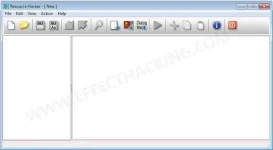
Resource häçker and then install it on your computer. Then open the Resource häçker application, you will see a window like this:
Note: Download link is at the end of this article.
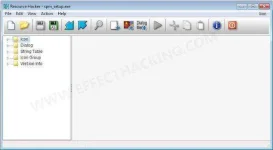
Now go to File > Open and then select the executable file. Then click on "Open". The window should look something like this:
Now right click on the "icon" folder and then select "Replace Icon" or press Ctrl+R. A small window will appear:
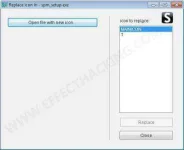
Then click on "Open file with new icon" and then select a .exe file with the icon you want to add to the target executable file, or you can select an icon file, resource file or a dll file.
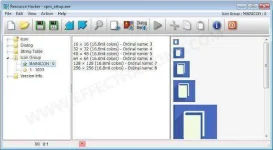
Now click on the "Replace" button. The resource häçker window should look something like this:
Now go to File > Save As.... Then save the file with a new name, for example, "New_spm_setup.exe".
That's all. I hope you liked. If you did, please share this article with your friends and followers.
See ya...
Download link: Resource häçker Setup.exe
There are a lot of reasons to change the icon of an executable file, some of them are listed below.
- Bored of the old icon.
- To make a malicious file look like a legitimate one.
- Pranks
Resource häçker and then install it on your computer. Then open the Resource häçker application, you will see a window like this:
Note: Download link is at the end of this article.
Now go to File > Open and then select the executable file. Then click on "Open". The window should look something like this:
Now right click on the "icon" folder and then select "Replace Icon" or press Ctrl+R. A small window will appear:
Then click on "Open file with new icon" and then select a .exe file with the icon you want to add to the target executable file, or you can select an icon file, resource file or a dll file.
Now click on the "Replace" button. The resource häçker window should look something like this:
Now go to File > Save As.... Then save the file with a new name, for example, "New_spm_setup.exe".
That's all. I hope you liked. If you did, please share this article with your friends and followers.
See ya...
Download link: Resource häçker Setup.exe