PH
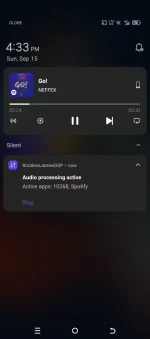
PHYo, this tut is for using spotify with rootlessJamesDSP, kung familiar kayo sa Viper4Android at jamesdsp manager, same thing but this is for non-root users...
App needed:
Shizuku: You do not have permission to view the full content of this post. Log in or register now.
RootlessJamesDSP: You do not have permission to view the full content of this post. Log in or register now.
Revanced Manager:You do not have permission to view the full content of this post. Log in or register now.
Spotify (APK):You do not have permission to view the full content of this post. Log in or register now.
Steps:
1. Open shizuku app then setup using usb debugging (android 11+) How to set up: You do not have permission to view the full content of this post. Log in or register now.
2. Open rootlessJamesDSP app and setup with shizuku permission
3. Download Spotify apk and install para ma ρá†ch
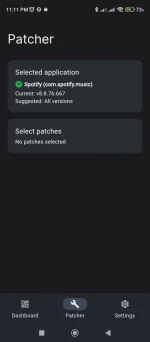
4. Open Revanced app>patcher>select application, then select spotify
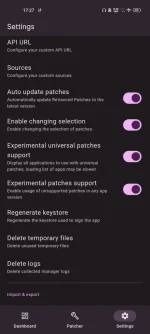
5. Then select patches and ρá†ch the "remove screen capture restriction"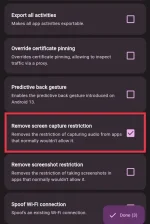
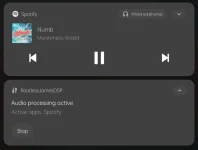
6. Hit "done" and ρá†ch, after ma install mag wo work na Spotify with rootlessjamesDSP
App needed:
Shizuku: You do not have permission to view the full content of this post. Log in or register now.
RootlessJamesDSP: You do not have permission to view the full content of this post. Log in or register now.
Revanced Manager:You do not have permission to view the full content of this post. Log in or register now.
Spotify (APK):You do not have permission to view the full content of this post. Log in or register now.
Steps:
1. Open shizuku app then setup using usb debugging (android 11+) How to set up: You do not have permission to view the full content of this post. Log in or register now.
2. Open rootlessJamesDSP app and setup with shizuku permission
3. Download Spotify apk and install para ma ρá†ch
4. Open Revanced app>patcher>select application, then select spotify
5. Then select patches and ρá†ch the "remove screen capture restriction"
6. Hit "done" and ρá†ch, after ma install mag wo work na Spotify with rootlessjamesDSP