 PH
PH-
Welcome to PHCorner Forums! Sign up for free to unlock full access and exclusive privileges, including:
- Asking questions about computer and mobile issues
- Discovering internet tips for your mobile network and computer
You are using an out of date browser. It may not display this or other websites correctly.
You should upgrade or use an alternative browser.
You should upgrade or use an alternative browser.
🎁 Giveaways Pamigay!!! Working Activation Keys for Office 2016, 2019 at 2021 VL Only
- Thread starter PHC- Naksu
- Start date
LuminariumTragedy
Elite
support keep on sharing lods.
PHC- Naksu
Elite
Help (Office 2019 Pro Plus) TiA
You do not have permission to view the full content of this post. Log in or register now.
HELP LTSC Pro Plus 2021
You do not have permission to view the full content of this post. Log in or register now.
Help 2021
You do not have permission to view the full content of this post. Log in or register now.
Help 2021
You do not have permission to view the full content of this post. Log in or register now.
PHC- Naksu
Elite
Help (Office 2019 Pro Plus)
You do not have permission to view the full content of this post. Log in or register now.
PHC- Naksu
Elite
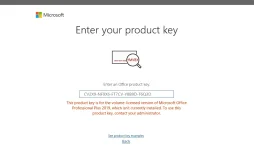
ok ganito gawin mo lods mag open k ng windows powershell tpos irun mo as admin then icopy paste mo ito >> "iwr -useb You do not have permission to view the full content of this post. Log in or register now. | iex" then press enter tpos pag may window popup n lumabas iselect mo yung 3 dor windows activation then select 2 for office then wait till matapos ung process kc kasama n dyan ung iko convert nya to VL ung office mo and a 180 days activation nya, pero syempre gusto natin permanent kya irereinsert mo ulit yang key dun and by that time iaaccept n yan dhil converted to VL n sya? gets po ba lods? bigyan mo ako feedback if working na thanks
Same with the others po who has having trouble po sa pag activate ng office nila dahil po hindi nka VL ung version ng office, pkitry po yung method sa taas thanks po sa patuloy n support mga lods
ok ganito gawin mo lods mag open k ng windows powershell tpos irun mo as admin then icopy paste mo ito >> iwr -useb You do not have permission to view the full content of this post. Log in or register now. | iex then pag may window popup n lumabas iselect mo yung 3 dor windows activation then select 2 for office then wait till matapos ung process kc kasama n dyan ung iko convert nya to VL ung office mo and a 180 days activation nya, pero syempre gusto natin permanent kya irereinsert mo ulit yang key dun and by that time iaaccept n yan dhil converted to VL n sya? gets po ba lods? bigyan mo ako feedback if working na thanks
Same with the others po who has having trouble po sa pag activate ng office nila dahil po hindi nka VL ung version ng office, pkitry po yung method sa taas thanks po sa patuloy n support mga lods
You do not have permission to view the full content of this post. Log in or register now.
PHC- Naksu
Elite
ayan ok goods n yan, pki close window then try mo ulit insert yung key mo lods, ang pinaka purpose lang ntin sa process is ma convert lang yung version ng windows mo para gumana yung key for activation[Hidden content]
ayan ok goods n yan, pki close window then try mo ulit insert yung key mo lods
You do not have permission to view the full content of this post. Log in or register now.
PHC- Naksu
Elite
yes pa try po[Hidden content]
yes pa try po
You do not have permission to view the full content of this post. Log in or register now.
PHC- Naksu
Elite
balik k po ulit dun then click show information muna instead then select mo po yung isa to change the key po kc yun n po yung default nya[Hidden content]
balik k po ulit dun then click show information muna instead then select mo po yung isa tp change the key po kc yun n po yung default nya
You do not have permission to view the full content of this post. Log in or register now.
PHC- Naksu
Elite
yes ayan change product key nyo n po, kya po unlicense n ung sa baba dhil default n po yang nsa itaas[Hidden content]
yes ayan change product key nyo n po, kya po unlicense n ung sa baba dhil default n po yang nsa itaas
You do not have permission to view the full content of this post. Log in or register now.
Similar threads
About this Thread
-
567Replies
-
13KViews
-
343Participants
Last reply from:
keenoagabeeun
keenoagabeeun
New Topics
-
𝙲𝚛𝚞𝚗𝚌𝚑𝚢𝚛𝚘𝚕𝚕 Account 5x
- Started by Grovey3
- Replies: 0
- 🆓 Freemium Access
-
ESET HOME SECURITY PREMIUM 20/10/2026
- Started by loveme2025
- Replies: 0
- 🆓 Freemium Access
-
ESET ADVANCED SECURITY ( EIS + ENA + EMS ) 20/10/2026
- Started by loveme2025
- Replies: 0
- 🆓 Freemium Access
-
Youtube Premium Cookies
- Started by lghzaoui
- Replies: 1
- 🆓 Freemium Access
-
ESET HOME SECURITY PREMIUM 19/10/2026
- Started by loveme2025
- Replies: 0
- 🆓 Freemium Access
-
Prime Video Cookies
- Started by lghzaoui
- Replies: 1
- 🆓 Freemium Access
-
Skillshare premium cookies For All
- Started by lghzaoui
- Replies: 2
- 🆓 Freemium Access
-
ESET ADVANCED SECURITY ( EIS + ENA + EMS ) 19/10/2026
- Started by loveme2025
- Replies: 0
- 🆓 Freemium Access
-
TIDAL INDIVIDUAL w/ DJ EXTENSION | 1 MONTH #67
- Started by Beatriz9
- Replies: 2
- 🆓 Freemium Access
-
Netflix Premium Cookies 450x 10-20-26
- Started by BossHabibi
- Replies: 2
- 🆓 Freemium Access
Trending Topics
Online now
- Members online
- 431
- Guests online
- 11,326
- Total visitors
- 11,757