 PH
PH-
Welcome to PHCorner Forums! Sign up for free to unlock full access and exclusive privileges, including:
- Asking questions about computer and mobile issues
- Discovering internet tips for your mobile network and computer
You are using an out of date browser. It may not display this or other websites correctly.
You should upgrade or use an alternative browser.
You should upgrade or use an alternative browser.
❓ Help Para saan po ba itong TTL Settings sa Router?
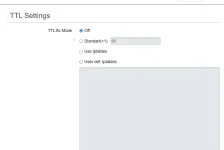
TTL stands for Time to Live. It is a value in an Internet Protocol (IP) packet that specifies the maximum number of hops or routers through which the packet can pass before being discarded. The TTL field is used to prevent packets from circulating indefinitely in the network, which could cause congestion and other problems. Each time a packet passes through a router, the TTL value is decremented by one. When the value reaches zero, the packet is discarded and an error message is sent back to the sender. By limiting the number of hops that a packet can make, TTL ensures that packets eventually reach their destination or are dropped if they cannot be delivered in a reasonable amount of time.
pag connected sa network first device TTL 64 sa umpisa. pag nag connect yung device 2 sa device 1 mabawasan yung TTL by one (TTL 63). ito rin gamit ng mga pisowifi sa pag detect ng devices malaman nila kung meron another device. pag nag decrement yung TTL.
pero pag meron ka router pwede bypass yan set lang all interfaces to TTL 64 or 65.
pag connected sa network first device TTL 64 sa umpisa. pag nag connect yung device 2 sa device 1 mabawasan yung TTL by one (TTL 63). ito rin gamit ng mga pisowifi sa pag detect ng devices malaman nila kung meron another device. pag nag decrement yung TTL.
pero pag meron ka router pwede bypass yan set lang all interfaces to TTL 64 or 65.
ano pong settings dapat gawin ko master? off lang ba? I'm using GOMO master.Time to Live TTL.
parang ping yan ex. TTL 64 (main device) pag connected yung other device sa main device mababawasan yung TTL to 63. yan identification para malaman kung ilang device naka connect sa main device through other device that is connected to the same chain of network.
wala naman. useful lang yan TTL Modification pag meron mga network na di pwede mag tether or hotspot.ano pong settings dapat gawin ko master? off lang ba? I'm using GOMO master.
yung gomo wala naman talaga. kaya ok lang kahit wala kana gawin.
Thank you master.wala naman. useful lang yan TTL Modification pag meron mga network na di pwede mag tether or hotspot.
yung gomo wala naman talaga. kaya ok lang kahit wala kana gawin.
paano e set yung ttl value sa lahat ng interface?TTL stands for Time to Live. It is a value in an Internet Protocol (IP) packet that specifies the maximum number of hops or routers through which the packet can pass before being discarded. The TTL field is used to prevent packets from circulating indefinitely in the network, which could cause congestion and other problems. Each time a packet passes through a router, the TTL value is decremented by one. When the value reaches zero, the packet is discarded and an error message is sent back to the sender. By limiting the number of hops that a packet can make, TTL ensures that packets eventually reach their destination or are dropped if they cannot be delivered in a reasonable amount of time.
pag connected sa network first device TTL 64 sa umpisa. pag nag connect yung device 2 sa device 1 mabawasan yung TTL by one (TTL 63). ito rin gamit ng mga pisowifi sa pag detect ng devices malaman nila kung meron another device. pag nag decrement yung TTL.
pero pag meron ka router pwede bypass yan set lang all interfaces to TTL 64 or 65.
About this Thread
-
5Replies
-
2KViews
-
3Participants
Last reply from:
xiv3r
xiv3r
New Topics
-
Facebook face ver failed, IG Deactivate
- Started by mhiemabhels
- Replies: 0
- ❓ Internet Questions
-
Pahelp mga boss pahingi po ng pisofi image 4.8.8v for rasberry pi
- Started by ayeman
- Replies: 0
- ❓ Internet Questions
-
Pahelp po SheerID ng gemini
- Started by ambitiousnoob
- Replies: 0
- ❓ Internet Questions
-
Ask abt Gfiber prepaid
- Started by LeBlanc
- Replies: 0
- ❓ Internet Questions
-
Cctv camera (same wifi)
- Started by oneal_31
- Replies: 2
- ❓ Internet Questions
-
New User Here, Help me
- Started by jaleeebean
- Replies: 0
- ❓ Internet Questions
-
Disable LOS Blinking HG8415X6-10
- Started by Shannun
- Replies: 0
- ❓ Internet Questions
-
Baka meron kayo solution tiktok paylater?
- Started by White chocolate
- Replies: 2
- ❓ Internet Questions
-
B535-932 firmware downgrade
- Started by Munchlax__
- Replies: 1
- ❓ Internet Questions
-
B535-932 Reflash Firmware pahelp po please
- Started by Munchlax__
- Replies: 2
- ❓ Internet Questions
Trending Topics
Online now
- Members online
- 1,126
- Guests online
- 6,501
- Total visitors
- 7,627