🔒 Closed Paano mabalik yung dati kong terminal sa Codeblocks?

Status
Not open for further replies.

zack_acupicop

Eternal Poster
paano mabalik yung dati kong terminal sa codeblocks? dati kase ganito terminal ko:
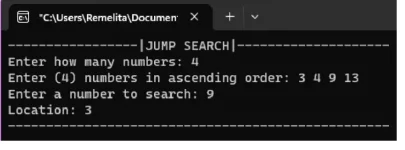
Screenshot_2023-05-23-03-07-49-017_com.miui.gallery.webp


pero nung nireinstall ko sya, ganito na sya:
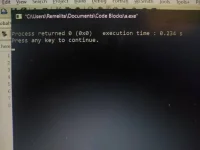
1684782544105852547433792490040.webp


gusto ko ibalik sa dati, tinry ko na pumunta sa settings<environment<terminal to launch, kaso di sya mapindot:
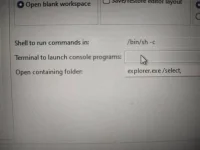
1684782763369221220726733315062.webp

pls napapangitan kase ako sa cmd na window, ty
 
Hindi kita masasagot ng diretso dahil wala na akong codelocks sa existing pc ko. Panay portable compilers ang gamit ko para iwas space - delete after use. Ang maaring problema siguro ayon sa nakita ko is this:
"C:\Users\Remilita\Documents\Code Blocks\a.exe", na sana ay "C:\Users\Remilita\Documents\CodeBlocks\a.exe"
Iwasan mo ang "spaces" sa path names - problematic yan. Sabi nga, paths with special symbols like spaces must be put in double quotes or install in the folder without spaces. Naayos naman yung installation sa environmental variables pero be strict with this norm in your projects sa kahit anong programming language na gamit mo. Nakaikot dyan problema mo.
 
Status
Not open for further replies.

About this Thread

  • 1
    Replies
  • 366
    Views
  • 2
    Participants
Last reply from:
alist1986

Trending Topics

Online now

Members online
1,155
Guests online
872
Total visitors
2,027

Forum statistics

Threads
2,273,748
Posts
28,951,295
Members
1,234,942
Latest member
nuzlock
Back
Top