PH
PHEl Rancho Corned Beef
Elite
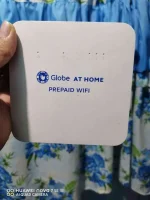
Pwede bo ba ipa openline to?
 Note: You are required to message Globe Telecom on Facebook Messenger directly. They do not reply to Twitter, and beware of Fake Globe accounts there. Do not go to Globe Store as they do not know what to do.
 Yes pwedi langlods pwedi bang ibang nunber gamitin ko?:wala na kasi signal yung sim ng GAH namin.
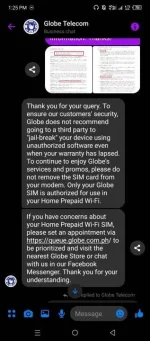
Eto sinabi sakin ng agentCredit to R1BNCView attachment 2529004
Permanent Openline/Unlock and Admin Access Huawei B312-939, B535-932 and other modem that requires SIM LOCK CODE in 3 easy steps!
Disclaimer: I am not responsible if you think this is a scam. I am not affiliated with Globe/Smart or other public telecommunications entities (PTE). I can only provide the steps that I took to get the codes. Mag ingat sa FIXER
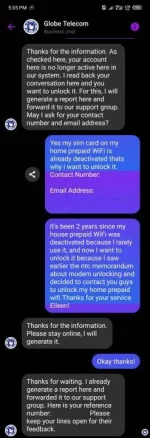
1. Login to your Facebook account and look for the official Globe Telecom Page (You do not have permission to view the full content of this post. Log in or register now.), click 'Send Message'. Get a hold of the real human agent. They might ask you for your contact information such as phone number, email address and name.
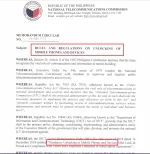
2. Explain to the agent that you need the device to be unlocked and the admin login code as well. If they refuse or just dumb to know. Provide them a screenshot of the NTC memorandum Circular 01-05-2019 aka. Mandatory Unlocking of Mobile Phones and Devices After Lock-In Period and Compliance with Terms and Conditions Contained in Subscription Agreements.
3. If the agent knows the unlocking, they should ask for your modem's IMEI, Serial Number and SIM Number (if applicable). Provide them and wait for 3 to 5 working days before they send you the unlock (SIM LOCK) CODE and the Admin Code for your Modem. Do not share these codes! They are for your device only.
Video tutorial: You do not have permission to view the full content of this post. Log in or register now.
Share to everyone, to avoid those ρáíd services!
CTTO & Copyright 2022: NTC, <@754923337632710736> , <@135680987534196737> , <@&598154552273010731> Backspace Team
License: CreativeCommons NonCommercial ShareALike NoDerivatives 4.0
Do not remove the credits and license notice if you are gonna share this post.