PH
PH#lifehäçk
Speeding up the USB drive
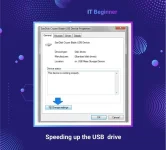
First, connect the device to your PC. Open Explorer, click on the device and select Properties. Click the Hardware tab, select your device from the list and click Properties.
Then click the Change settings button so the Policy tab appears in the window - go to it. In the Deletion Policy section, select Optimal performance, and in the Record Caching Policy section, check the Allow record caching for this device checkbox.
Speeding up the USB drive
First, connect the device to your PC. Open Explorer, click on the device and select Properties. Click the Hardware tab, select your device from the list and click Properties.
Then click the Change settings button so the Policy tab appears in the window - go to it. In the Deletion Policy section, select Optimal performance, and in the Record Caching Policy section, check the Allow record caching for this device checkbox.