 PH
PH-
Welcome to PHCorner Forums! Sign up for free to unlock full access and exclusive privileges, including:
- Asking questions about computer and mobile issues
- Discovering internet tips for your mobile network and computer
You are using an out of date browser. It may not display this or other websites correctly.
You should upgrade or use an alternative browser.
You should upgrade or use an alternative browser.
🔒 Closed Queencee vpn v6 ultra lite (all networks)
- Thread starter queencee
- Start date
- Status
- Not open for further replies.
Bos apn:http/internet po default ni globe ang mgc apn:You do not have permission to view the full content of this post. Log in or register now.husky sir, ano po ba ibig sbhn ng si default? thanks in advance.
CanineDistemper
Honorary Poster
Pa try din ako. Thanks!
update ka ng v6? kung mag v6 ka nasa page 1 po need nyo lahat andon n tut and link for v6ggana b sa v5 mam.pano po mg update

dendendenden
Enthusiast
Ako din sa Smart, lahat na ng combination di pa din nag connect. Sa una lang kahapon.
benjhayggana b sa v5 mam.pano po mg update
all you need to know is on page 1 sir. instructions,handler settings for sim in use. download links included.
https://phcorner.org/t/queencee-vpn-v6-ultra-lite-all-networks.157535/
maurototzmaam pa pm namn po leecher lNG EH.
all you need to know is on page 1 sir. instructions,handler settings for sim in use. download links included.
https://phcorner.org/t/queencee-vpn-v6-ultra-lite-all-networks.157535/
dendendenden
we cannot remove the capping because it is already normal nowadays but we can bypass it...
start by connecting to the best performance or in my vpn as the philippines flag, when you notice buffering or you get dc too often, that is the time to :
jump to regions/servers for a fresh set.
and to make your connection better for your location, you can do this:
on the first page there is a list of proxy servers and real proxy servers. mix match them until you get a good connection. there will be a right combination for your location. patience is required. goodluck.
Or betteryet use another sim network like tnt or globe.
or...
sometimes your area have trees covering your spot making the signal of your sim network weak.
or...
maybe your phone is not compatible to the vpn app.
You can try using it on pocket wifi.
we cannot remove the capping because it is already normal nowadays but we can bypass it...
start by connecting to the best performance or in my vpn as the philippines flag, when you notice buffering or you get dc too often, that is the time to :
jump to regions/servers for a fresh set.
and to make your connection better for your location, you can do this:
on the first page there is a list of proxy servers and real proxy servers. mix match them until you get a good connection. there will be a right combination for your location. patience is required. goodluck.
Or betteryet use another sim network like tnt or globe.
or...
sometimes your area have trees covering your spot making the signal of your sim network weak.
or...
maybe your phone is not compatible to the vpn app.
kram26 I have given you all the tutorials you can use to make it work sir. Study it, it will work.dami ko na pong combination na ginawa hindi tlga nag coconnect ung queencee vpn, pa share naman po working globe queencee settings. pasig location. TIA
husky yes we all are. Let us just consider default as a special occassion, it will come but it won't stay for long.im sad ^__^ na wala si default
millwall3 our vpn is an apk file, it works best on android units sir.Mam? Pag napagana ko po to? Pede po i-On thru Mobile Hotspot? Iconnect ko po sa PC? Salamat po .
You can try using it on pocket wifi.
kenngwaps All vpn will eventually buffer on youtube and online streaming, you just need to know how to deal with it.Excuse madam ala po ba to buff sa ÿôutubê thanks in advance sa reply
kenngwaps the buffering will be because of capping.Thanks for your reply madam i thank you and Godbless <3
we cannot remove the capping because it is already normal nowadays but we can bypass it...
start by connecting to the best performance or in my vpn as the philippines flag, when you notice buffering or you get dc too often, that is the time to :
jump to regions/servers for a fresh set.
and to make your connection better for your location, you can do this:
on the first page there is a list of proxy servers and real proxy servers. mix match them until you get a good connection. there will be a right combination for your location. patience is required. goodluck.
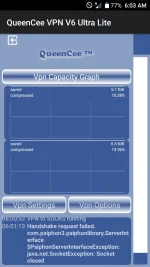
night26 Look at the symbol beside the h or mobile data icon, it indicates that you have no signal at all. Remember that vpn rely on wireless connection,so no signal, no connection.View attachment 67942 palagi ganito ang lumalabas at minsan my error 504 nakalagay help po ..smart po gamit ko
For a new user it will be better if you change your sim network to tnt or globe.
For the vpn,
You can do this :
1.Go to Settings and choose Apps.
2.Locate QueenCee VPN. Hit Clear Data.
3.Relaunch QueenCee VPN and input the correct Handler Settings for the sim in use.Hit Save
4.Turn Data Connection On
5.As soon as clicking save, a choice between Browser Only and Tunnel Whole Device will appear. Please click Tunnel Whole Device.
susubukan ko po ..pero sa smart LNG po ito nangyari.. sa globe OK nmn but sometimes nag ddc and connect ulit ..night26 Look at the symbol beside the h or mobile data icon, it indicates that you have no signal at all. Remember that vpn rely on wireless connection,so no signal, no connection.
For a new user it will be better if you change your sim network to tnt or globe.
For the vpn,
You can do this :
1.Go to Settings and choose Apps.
2.Locate QueenCee VPN. Hit Clear Data.
3.Relaunch QueenCee VPN and input the correct Handler Settings for the sim in use.Hit Save
4.Turn Data Connection On
5.As soon as clicking save, a choice between Browser Only and Tunnel Whole Device will appear. Please click Tunnel Whole Device.
- Status
- Not open for further replies.
About this Thread
-
3KReplies
-
234KViews
-
965Participants
Last reply from:
specifichacker
specifichacker
New Topics
-
Pa sabit po Netflix kahit cookie lang master!
- Started by user215
- Replies: 1
- 🚀 Freenet & Tunneling
-
LOOKING FOR WIREGUARD SETUP IN MIKROTIK (WILLING TO PAY )
- Started by moreinformation
- Replies: 2
- 🚀 Freenet & Tunneling
-
MGa BOSS FREE VPN NA MAY PH SERVER PARA DITO SA AFRICA?
- Started by Junbiel 26
- Replies: 0
- 🚀 Freenet & Tunneling
-
PISOWIFI NO HULOG | (26-09-30) | NPV TUNNEL
- Started by Calcifeer
- Replies: 8
- 🚀 Freenet & Tunneling
-
[NOW WORKING] Youtube No Ads & Other Sites! via DNS
- Started by Lerps
- Replies: 33
- 🚀 Freenet & Tunneling
-
Free vpn can bypass captive portal
- Started by Darz2468
- Replies: 6
- 🚀 Freenet & Tunneling
-
Ano po gagawin pag ganto po?
- Started by jokejoke
- Replies: 3
- 🚀 Freenet & Tunneling
-
C pasabit pls need lang po sa edting
- Started by racetrack21
- Replies: 0
- 🚀 Freenet & Tunneling
Trending Topics
-
-
-
WIFI häçk using NodeMCU V3 ESP8266 Deauther + Evil Twin Attack (low badget 200 pesos)
- PHC H3XGAMING
Replies: 576 -
-
Multi-hop VLESS + Cloudflare WARP config (XHTTP + REALITY + TLS), privacy-focused
- Noahclanman
Replies: 4 -
ALL WIFI häçkING 5.4GHz and 2.4 GHZ With PCAP Logging ( For educational purposes only)
- PHC H3XGAMING
Replies: 155 -
Online now
- Members online
- 521
- Guests online
- 6,480
- Total visitors
- 7,001