🔒 Closed Queencee vpn v6 ultra lite (all networks)

Status
Not open for further replies.
mam @queecee, ask ko lang po, nung may load pa po ako, nakakasurf ako, then nga 20+mbps, ngyn na zero load na po globe ko, hindi na po maka connect sa queencee vpn, kung hindi "server is locating, fetching naman sya. thanks for any help.
kram26 you must have been capped sir.
we cannot remove the capping because it is already normal nowadays but we can bypass it...
start by connecting to the best performance or in my vpn as the philippines flag, when you notice buffering or you get dc too often, that is the time to :
jump to regions/servers for a fresh set.
and to make your connection better for your location, you can do this:
on the first page there is a list of proxy servers and real proxy servers. mix match them until you get a good connection. there will be a right combination for your location. patience is required. goodluck.
 
kram26
you are a globe / tm sim user, ok...have you made an apn mgc on your phone settings before proceeding to the vpn app? if not, please do this first :
•mgc apn phone setting
create apn mgc on your phone.
you may follow these steps...
1. settings
2. more
3. mobile network
4. access point name
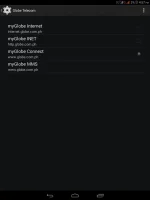
5. choose globe telecom
6. choose myglobe connect
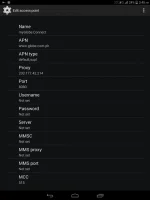
7. name: my globe connect
8. apn: You do not have permission to view the full content of this post. Log in or register now.
9. proxy: 203.177.42.214 or 108.67.222.222
10. port 8080

moQ88e0.webp

HobpX8p.webp
-do all of these on your cellphone's settings
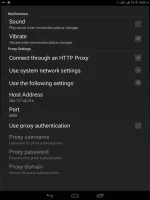
and now let us proceed to queencee vpn v6 ultra lite, click on the vpn options.
•vpn options
connect trough an http proxy: check
use the following settings: check
host address: 203.177.42.214
port: 8080

Rr0P55i.webp
-input the correct globe/tm handler settings
-hit mobile data "on"
: if you can see the connected icon status and the key on top, those are the indications that you are successfully connected to the internet using the vpn via mgc. goodluck.
 
kram26 you must have been capped sir.
we cannot remove the capping because it is already normal nowadays but we can bypass it...
start by connecting to the best performance or in my vpn as the philippines flag, when you notice buffering or you get dc too often, that is the time to :
jump to regions/servers for a fresh set.
and to make your connection better for your location, you can do this:
on the first page there is a list of proxy servers and real proxy servers. mix match them until you get a good connection. there will be a right combination for your location. patience is required. goodluck.
1. settings
2. more
3. mobile network
4. access point name
5. choose globe telecom
6. choose myglobe connect
7. name: my globe connect
8. apn: You do not have permission to view the full content of this post. Log in or register now.
9. proxy: 203.177.42.214 or 108.67.222.222
10. port 8080

dito po yta ako may problem, pag dating ko po sa apn, hindi ko makita or ma choose ang globe telecom and choose myglobe connect, pag open ko po ng apn, meron ng mgc at myglobeconnect, pipiliin ko lang po ba un, tpos susundin ko na yung step number 8,9,10?
 
1. settings
2. more
3. mobile network
4. access point name
5. choose globe telecom
6. choose myglobe connect
7. name: my globe connect
8. apn: You do not have permission to view the full content of this post. Log in or register now.
9. proxy: 203.177.42.214 or 108.67.222.222
10. port 8080


dito po yta ako may problem, pag dating ko po sa apn, hindi ko makita or ma choose ang globe telecom and choose myglobe connect, pag open ko po ng apn, meron ng mgc at myglobeconnect, pipiliin ko lang po ba un, tpos susundin ko na yung step number 8,9,10?
kram26 if it is already set after clickng, then proceed to the next step sir.
 
kram26 if it is already set after clickng, then proceed to the next step sir.
sorry na late lang pag post ko nung last post ko, tama na po ako dun sa unang una, then vpn option ok na rin po, sa queence vpn po, 356kib lang po nakikita ko, pag gnun po ba tuloy lang ako mag mix and match ng proxy at real proxy?
 
sorry na late lang pag post ko nung last post ko, tama na po ako dun sa unang una, then vpn option ok na rin po, sa queence vpn po, 356kib lang po nakikita ko, pag gnun po ba tuloy lang ako mag mix and match ng proxy at real proxy?
kram26 the thing with mgc is low on bandwith capacity but consistent in connection. Makapit ika nga. If you encounter capping, just follow the trick I replied to you earlier sir.
 
kram26 the thing with mgc is low on bandwith capacity but consistent in connection. Makapit ika nga. If you encounter capping, just follow the trick I replied to you earlier sir.


kram26 the thing with mgc is low on bandwith capacity but consistent in connection. Makapit ika nga. If you encounter capping, just follow the trick I replied to you earlier sir.
ok po mam! kaso po hindi nag tutuloy yung connecting sa queencee vpn, halos na mix ko na po lahat.

mam tanong ko lang po ito
"start by connecting to the best performance or in my vpn as the philippines flag,"
ano po ung "to the best performance"
 
ok po mam! kaso po hindi nag tutuloy yung connecting sa queencee vpn, halos na mix ko na po lahat.

mam tanong ko lang po ito
"start by connecting to the best performance or in my vpn as the philippines flag,"
ano po ung "to the best performance"
kram26 yes capping is expected to give you disturbances on the capacity and disconnection on the long run but you can do something about it.

The best performance term can be seen on the early versions of queencee vpn, here in v6 the Philippines region is your first move to jumping to other country/servers.
 
mam, queencee normal lang po ba na hindi talaga kumokonek ung vpn? naikot ko na po lahat, ano pa po ba pdeng gawain? thanks!
kram26
if you cannot connect it means, you need to test another combination for your location.
on the first page there is a list of proxy servers and real proxy servers. mix match them until you get a good connection. there will be a right combination for your location.
 
mam, queencee ask ko lang po, pag naka-on po mobile wifi ko mabilis mag connect ung queencee vpn, pero pag mobile data, since nag post ako knina hindi pa nag successful ang connection?
 
mam, queencee ask ko lang po, pag naka-on po mobile wifi ko mabilis mag connect ung queencee vpn, pero pag mobile data, since nag post ako knina hindi pa nag successful ang connection?
:ROFLMAO:Kahit po naka off ang wifi ng phone ninyo at data lang ang naka on para maka konek gagana po yan basta sundin lang lahat ang tut ni sistah:banghead:
Sa vpn option dapat nalagay ninyo sa host address ang 203.177.42.214 at port 8080
Cdc on/off data kung hindi parin maka konek boomm na po yan:ROFLMAO:
 
mam, queencee ask ko lang po, pag naka-on po mobile wifi ko mabilis mag connect ung queencee vpn, pero pag mobile data, since nag post ako knina hindi pa nag successful ang connection?
:ROFLMAO:Kahit po naka off ang wifi ng phone ninyo at data lang ang naka on para maka konek gagana po yan basta sundin lang lahat ang tut ni sistah:banghead:
Sa vpn option dapat nalagay ninyo sa host address ang 203.177.42.214 at port 8080
Cdc on/off data kung hindi parin maka konek boomm na po yan:ROFLMAO:
boss, kahit wlang load ang globe sim and kahit wla registration sa promo dapat gagana boss diba? sorry newbie lang, bago kasi lahat sakin ung mga ganito, thanks sa help!
 
Status
Not open for further replies.

About this Thread

  • 3K
    Replies
  • 230K
    Views
  • 965
    Participants
Last reply from:
specifichacker

Online now

Members online
1,024
Guests online
1,175
Total visitors
2,199

Forum statistics

Threads
2,271,690
Posts
28,937,381
Members
1,237,808
Latest member
ricardsracs
Back
Top