🔒 Closed Lazzy Tool :)

Status
Not open for further replies.

lil_pride

Enthusiast
I come up with this tool kasi may nakita ako dito pero limited lang…so gumawa ako nang medyo maraming commands basi sa naisipan ko lang din.. :p


NMxJ2IS.webp


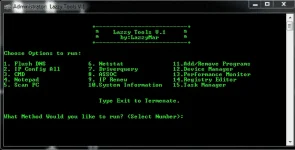
Under this Tool are:

1. Flush DNS

2. IP Config All

3.CMD

4.Notepad

5. Scan PC

6.NetStat

7. Driverquery

8.ASSOC

9.IP Renew

10. System Information

11.Add/Remove Programs

12. Device Manager

13. Performance Monitor

14.Registry Editor

15. Task Manager

Sana maka tulong ito...(y):sneaky:
 

Attachments

Aside sa LAZZY Tool, mas ok din kung may access kayo sa GodMode option ng Win7 to Win10.
1. Create a blank folder on your desktop para lagi nyong nakikita.
2. Remane it exactly like this: GodMode.{ED7BA470-8E54-465E-825C-99712043E01C}
3. May GodMode shortcut na kayo with a lot of options to tweak Windows.
Or, get modded apps here for additonal features comapatible with your OS (for XP and Vista as well):
You do not have permission to view the full content of this post. Log in or register now.

Kung gusto nyo namang gumawa ng sariling LAZZY tool he he, pag-aralan nyo yung basic commands here for a start:
You do not have permission to view the full content of this post. Log in or register now.
Ito yung batch script guide link para magawa kayo ng menu nyo:
You do not have permission to view the full content of this post. Log in or register now.

Mamili kayo ng pwede nyong gamiting batch script, tulad ng nasa tool ni bosing. If you're wise he he, pag-aralan nyo na lang yung bat file sa Temp folder nyo after executing the tool ;) for your own use!
 
Aside sa LAZZY Tool, mas ok din kung may access kayo sa GodMode option ng Win7 to Win10.
1. Create a blank folder on your desktop para lagi nyong nakikita.
2. Remane it exactly like this: GodMode.{ED7BA470-8E54-465E-825C-99712043E01C}
3. May GodMode shortcut na kayo with a lot of options to tweak Windows.
Or, get modded apps here for additonal features comapatible with your OS (for XP and Vista as well):
You do not have permission to view the full content of this post. Log in or register now.

Kung gusto nyo namang gumawa ng sariling LAZZY tool he he, pag-aralan nyo yung basic commands here for a start:
You do not have permission to view the full content of this post. Log in or register now.
Ito yung batch script guide link para magawa kayo ng menu nyo:
You do not have permission to view the full content of this post. Log in or register now.

Mamili kayo ng pwede nyong gamiting batch script, tulad ng nasa tool ni bosing. If you're wise he he, pag-aralan nyo na lang yung bat file sa Temp folder nyo after executing the tool ;) for your own use!

Nice one boss. (y)
 
Status
Not open for further replies.

About this Thread

  • 23
    Replies
  • 984
    Views
  • 19
    Participants
Last reply from:
henji

Online now

Members online
1,107
Guests online
1,576
Total visitors
2,683

Forum statistics

Threads
2,291,878
Posts
29,073,281
Members
1,210,095
Latest member
kinemperfly
Back
Top