 PH
PH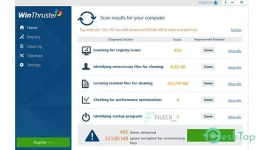
Make your PC run fast again
WinThruster is a program for the Windows operating system that helps users clean up their computer by removing unnecessary files, repairing PC problems and decreasing program load time. Especially with older computers and laptops, load times and ease of use becomes hampered by clutter. Unused applications and software add unnecessary bloating to your system and in turn, slow down its operation. With WinThruster, you can clean it up and make it faster quickly and easily. Like its name suggests, it can thrust your PC forward and give it new life to make it run fast and snappier once again.- WInThruster Product Key comes with full power to repair all kinds of PC issues.
- It can detect and remove all the unnecessary files from registry items.
- In addition, it has the ability to remove PC clutter and unused files.
- Also, this application can stop all the background processes running unknowingly.
- It can breathe new life into your old PC and extend your PC life.
- This software makes a backup copy of your registry before doing any operation.
- In addition, it allows you to restore your PC with just a single click.
- Moreover, it has the ability to perform scans automatically on your scheduled time.
- Above all, this application provides you a Startup Manager to manage startup items for a quick startup.
WinThruster Pro Overview
This is a state-of-the-art technology that detects and repairs hundreds of invalid references that accumulate in your registry-with one click.Advanced feature of this program is the “Log Details” screen within the “Settings” menu. In this menu, you can view the exact dates and times of each performance scan. You can open any of these log files to see the exact details.
Features of WinThruster Pro
Choose preferred languageRun on system startup
Close it after repair
Minimize while scanning for issues
Auto Repair Issues
Create backup before repairing issues
Check for updates automatically
Auto scan for issues when software is launched
System Requirements and Technical Details
Supported OS: Windows 7/8/10Processor: Pentium IV or higher
RAM: 1 GB RAM (2 GB recommended)
Free Hard Disk Space: 200 MB or more
Sa mga naghahanap po nang fix Dll mahirap na po at meroon bugs, pero magkasingkatulad po nitong winthruster.
Spoiler contents are visible only to Established Members.