 PH
PHAs is known, as long as you can remove, reset orrecover RAR password, everyone could open files in encrypted RAR archive. Whether we canremove or reset RAR password? Please go on to read the passage solving the problem in two parts with software, RAR Password Genius and WinRAR.
Part 1: Remove RAR Password with RAR Password Genius
Part 2: Reset RAR File Password with WinRAR
Part 1: Remove RAR Password with RAR Password Genius
In fact, when you forgot RAR file password, you have two choices. One is ask someone for RAR open password. If unfortunately it doesn't work, you can reset and remove RAR password with a powerful RAR password tool.
RAR Password Genius is such an effective third-party tool. Its Standard version is provided for users to get RAR forgotten password with four password attack methods, while Professionalversion seems to recover RAR password faster with default Brute-force attack type in LAN. After RAR password recovery with RAR Password Genius, you could easily remove RAR password.
Now we will get RAR Password Genius Standard version to help RAR password remove, by recovering RAR password at first and then removing encrypted RAR file password.
Tip: If you have RAR Password Genius Professional in hand, please follow its user guideto do.
You do not have permission to view the full content of this post. Log in or register now.
Step 1: Click Open button to import the RAR file you forgot password. You will see it in Encrypted File box.
Step 2: Select password attack type from Type of attack. For example, if you remember part of the RAR password, you could choose Mask attack and set "Mask" option.
Refer to: Brute-force/Mask/Dictionary Password Recovery Attack Settings
You do not have permission to view the full content of this post. Log in or register now.
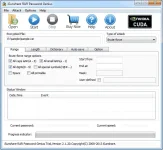
Step 3: Click Start button to begin RAR password reset. Wait few seconds, when a new window pops up, the RAR file password is found there.
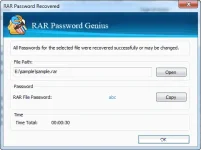
You can choose to copy password and extract encrypted RAR file or save RAR password now. After that, remove RAR password in archive software, such as WinRAR.
Step 4: Remove RAR password in WinRAR with recovered password.
1. Extract encrypted RAR archive with recovered password in WinRAR.
2. Create a new RAR with files extracted from old encrypted RAR archive, and don't set a password.
3. Take new RAR file instead of original RAR archive from then on. Congratulations! Your RAR file password has been removed successfully.
2: Reset RAR File Password with WinRAR
Besides removing RAR password, when you can open or extract encrypted RAR file with the help of RAR Password Genius, reset a new RAR password for encrypted RAR file would become not hard any longer.
Step 1: Open WinRAR program, select the files extracted from original encrypted RAR file, and click Add button.
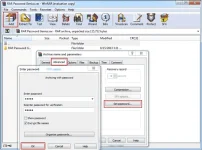
Step 2: On the pop-up window "Archive name and parameters", choose Advanced tab and clickSet password button. (Or click Set passwordbutton under General tab)
Step 3: While a new window disappears, Enter password and Reenter password for verification. Click OK to make sure rar password reset. Click OK twice at last to create encrypted RAR file withnew password instead of forgotten one.
Tips: It seems that no matter you want to reset or remove RAR password for encrypted RAR file, as long as you have RAR Password Genius, everything will be easy to do. Because after recovering RAR password with RAR Password Genius Standard or Professional, we can get recovered password to extract encrypted RAR file, then remove or reset RAR password by creating new encrypted RAR file without or with password.
Thanks for viewing
Part 1: Remove RAR Password with RAR Password Genius
Part 2: Reset RAR File Password with WinRAR
Part 1: Remove RAR Password with RAR Password Genius
In fact, when you forgot RAR file password, you have two choices. One is ask someone for RAR open password. If unfortunately it doesn't work, you can reset and remove RAR password with a powerful RAR password tool.
RAR Password Genius is such an effective third-party tool. Its Standard version is provided for users to get RAR forgotten password with four password attack methods, while Professionalversion seems to recover RAR password faster with default Brute-force attack type in LAN. After RAR password recovery with RAR Password Genius, you could easily remove RAR password.
Now we will get RAR Password Genius Standard version to help RAR password remove, by recovering RAR password at first and then removing encrypted RAR file password.
Tip: If you have RAR Password Genius Professional in hand, please follow its user guideto do.
You do not have permission to view the full content of this post. Log in or register now.
Step 1: Click Open button to import the RAR file you forgot password. You will see it in Encrypted File box.
Step 2: Select password attack type from Type of attack. For example, if you remember part of the RAR password, you could choose Mask attack and set "Mask" option.
Refer to: Brute-force/Mask/Dictionary Password Recovery Attack Settings
You do not have permission to view the full content of this post. Log in or register now.
Step 3: Click Start button to begin RAR password reset. Wait few seconds, when a new window pops up, the RAR file password is found there.
You can choose to copy password and extract encrypted RAR file or save RAR password now. After that, remove RAR password in archive software, such as WinRAR.
Step 4: Remove RAR password in WinRAR with recovered password.
1. Extract encrypted RAR archive with recovered password in WinRAR.
2. Create a new RAR with files extracted from old encrypted RAR archive, and don't set a password.
3. Take new RAR file instead of original RAR archive from then on. Congratulations! Your RAR file password has been removed successfully.
2: Reset RAR File Password with WinRAR
Besides removing RAR password, when you can open or extract encrypted RAR file with the help of RAR Password Genius, reset a new RAR password for encrypted RAR file would become not hard any longer.
Step 1: Open WinRAR program, select the files extracted from original encrypted RAR file, and click Add button.
Step 2: On the pop-up window "Archive name and parameters", choose Advanced tab and clickSet password button. (Or click Set passwordbutton under General tab)
Step 3: While a new window disappears, Enter password and Reenter password for verification. Click OK to make sure rar password reset. Click OK twice at last to create encrypted RAR file withnew password instead of forgotten one.
Tips: It seems that no matter you want to reset or remove RAR password for encrypted RAR file, as long as you have RAR Password Genius, everything will be easy to do. Because after recovering RAR password with RAR Password Genius Standard or Professional, we can get recovered password to extract encrypted RAR file, then remove or reset RAR password by creating new encrypted RAR file without or with password.
Thanks for viewing
