🔒 Closed samsung galxy y

Status
Not open for further replies.

santosmark1

Enthusiast
mga sir patulong nmn :D ayaw kse mag punta sa recovery mode yun akin pano ggwen ko ?
ifformat ko kse yun cp ko eh hehe :D tnx sa may nakakaalam
 
Flashing mo na lang po DL mo to andyan na kailangan mo You do not have permission to view the full content of this post. Log in or register now.
at ito driver nya You do not have permission to view the full content of this post. Log in or register now.
Step 1. Install mo muna ang driver nya sa PC
Step 2. Press Volume up+power+menu ng phone
Step 3. run Odin and connect your phone to pc via usb cable
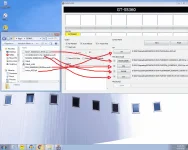
Step 4. Click the following files follow mo lang sa image po
Step 5. Click start
Step 6. Wait it to finish downloading in phone and pass in odin
Step 7. Wait your phone to reboot and Disconnect your phone
Step 8. Set your phone and your done...
 

Attachments

  • ssgy.webp
    ssgy.webp
    188.9 KB · Views: 21
Flashing mo na lang po DL mo to andyan na kailangan mo You do not have permission to view the full content of this post. Log in or register now.
at ito driver nya You do not have permission to view the full content of this post. Log in or register now.
Step 1. Install mo muna ang driver nya sa PC
Step 2. Press Volume up+power+menu ng phone
Step 3. run Odin and connect your phone to pc via usb cable
Step 4. Click the following files follow mo lang sa image po
Step 5. Click start
Step 6. Wait it to finish downloading in phone and pass in odin
Step 7. Wait your phone to reboot and Disconnect your phone
Step 8. Set your phone and your done...[/sir dun sa may ID:com nya walang nalabas ? bkit ganun?
 
Flashing mo na lang po DL mo to andyan na kailangan mo You do not have permission to view the full content of this post. Log in or register now.
at ito driver nya You do not have permission to view the full content of this post. Log in or register now.
Step 1. Install mo muna ang driver nya sa PC
Step 2. Press Volume up+power+menu ng phone
Step 3. run Odin and connect your phone to pc via usb cable
Step 4. Click the following files follow mo lang sa image po
Step 5. Click start
Step 6. Wait it to finish downloading in phone and pass in odin
Step 7. Wait your phone to reboot and Disconnect your phone
Step 8. Set your phone and your do

 
Status
Not open for further replies.

About this Thread

  • 4
    Replies
  • 659
    Views
  • 3
    Participants
Last reply from:
santosmark1

Trending Topics

Online now

Members online
895
Guests online
721
Total visitors
1,616

Forum statistics

Threads
2,275,563
Posts
28,964,107
Members
1,231,866
Latest member
terrorspeed
Back
Top