 PH
PH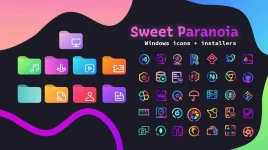
Sweet Paranoia Icon Theme
 Requirements:
7TSP GUI 2019 Edition to install the icon pack.
Windows 10 (1903+) -or- Windows 11 (current)
Installation:Open up 7TSP & click Add a Custom Pack & select the downloaded file. (you'll need to remove the extension .remove first)
Click on Start Patching.
By default 7TSP will create a restore point & install the icon pack.
Once installation is complete, reboot & you're done.
© Niivu
You do not have permission to view the full content of this post. Log in or register now. 64MB