 PH
PHWhat If Your Google Account Is häçked?
If you don’t have access to any of those recovery options then the only option is to verify your identity by answering a set of questions related to the häçked Google account. Your answers will help them ensure that you’re the actual account holder and only you get access to your account.
In General You’ll Need The Following Information To Quickly Reset Password
Here’s What To Do When Your Gmail Account Is häçked
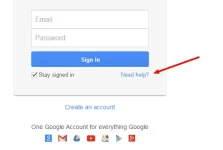
Step 1: Go to You do not have permission to view the full content of this post. Log in or register now.and click on “Need help?” link.
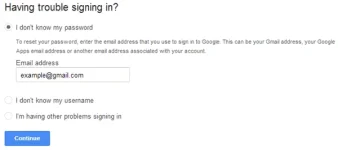
Step 2: It redirects you to the You do not have permission to view the full content of this post. Log in or register now. page. Select the “I don’t know my password” option on that page and enter your Google/Gmail ID and click “Continue”.
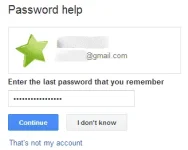
Step 3: Now you may see a Captcha form, so fill it out and click “Continue”. On the next page you can enter your last password that you remember and click “Continue” or simply choose the “I don’t know” option.
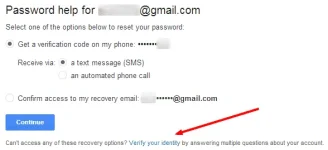
Step 4: Now Google will offer the basic password reset option. It will work when you forgot your Google account password but not when it’s häçked. It’s because the häçker may have already changed all those details so you won’t be able to recover using any of those options. Now the only way to recover the password is to use the “Verify your identity” option.
Step 5: “Verify your identity” page takes you to an account verification process. So you have to verify your identity by answering multiple questions about your account.
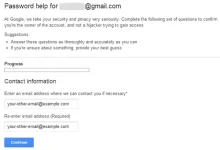
Google suggests you to answer the questions as accurately as possible (because the strength of your answers will determine if they can return your account or not) and if you’re not sure about something then you can provide your best guess.
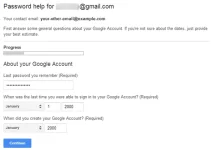
Though you’re allowed to skip these questions it’s very important.
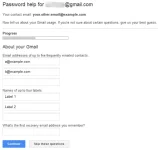
f you’re not sure about the date you started using Google services then you can even get help from your friends. For example, I can check the verification text messages sent by various mobile messenger apps to find the date I started using an app. Or I can find the date I started using an e-mail account by asking my friends to check the incoming messages from that e-mail account.
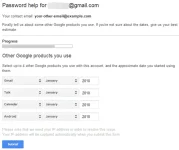
If the information that you’ve provided matches with the information on the Google account then you will be able to reset the password. Otherwise Google will instantly notify you that the information you’ve provided does not match the information on the account. But you’re allowed to submit the form once again with more accurate information.
If you don’t have access to any of those recovery options then the only option is to verify your identity by answering a set of questions related to the häçked Google account. Your answers will help them ensure that you’re the actual account holder and only you get access to your account.
In General You’ll Need The Following Information To Quickly Reset Password
- What was the last password that you remember (must have)?
- When was the last time (month, date, and year) you were able to sign in to your Gmail account (must have)?
- When did you (month and year) create your Gmail account (must have)?
- What was the answer to your security question?
- E-mail addresses of up to 5 frequently emailed contacts.
- Name of up to 4 labels.
- What was the first account recovery e-mail address that you remember?
- Name up to 4 You do not have permission to view the full content of this post. Log in or register now. that you were using with your Gmail account and also the approximate date (month and year) you started using them.
- Phone numbers that you may have associated with your Google account.
- Information about how you lost access to your Google/Gmail account.
Here’s What To Do When Your Gmail Account Is häçked
Step 1: Go to You do not have permission to view the full content of this post. Log in or register now.and click on “Need help?” link.
Step 2: It redirects you to the You do not have permission to view the full content of this post. Log in or register now. page. Select the “I don’t know my password” option on that page and enter your Google/Gmail ID and click “Continue”.
Step 3: Now you may see a Captcha form, so fill it out and click “Continue”. On the next page you can enter your last password that you remember and click “Continue” or simply choose the “I don’t know” option.
Step 4: Now Google will offer the basic password reset option. It will work when you forgot your Google account password but not when it’s häçked. It’s because the häçker may have already changed all those details so you won’t be able to recover using any of those options. Now the only way to recover the password is to use the “Verify your identity” option.
Step 5: “Verify your identity” page takes you to an account verification process. So you have to verify your identity by answering multiple questions about your account.
Google suggests you to answer the questions as accurately as possible (because the strength of your answers will determine if they can return your account or not) and if you’re not sure about something then you can provide your best guess.
Though you’re allowed to skip these questions it’s very important.
f you’re not sure about the date you started using Google services then you can even get help from your friends. For example, I can check the verification text messages sent by various mobile messenger apps to find the date I started using an app. Or I can find the date I started using an e-mail account by asking my friends to check the incoming messages from that e-mail account.
If the information that you’ve provided matches with the information on the Google account then you will be able to reset the password. Otherwise Google will instantly notify you that the information you’ve provided does not match the information on the account. But you’re allowed to submit the form once again with more accurate information.
