 PH
PHLelouch Lamperouge
🐝 on duty 🐝
How to Enable Dark Mode on all Websites in Google Chrome [Guide]
There’s a good chance that you might already be using dark mode regularly on your Android device, iPhone or PC to protect your eyes from being seared by bright white lights that may cause sleeplessness and eye fatigue, but what about having dark mode on all the websites that you may visit using your favorite web browser?
That said, in this step-by-step guide we will lean how you can enable dark mode on all websites in Google Chrome using an free Chrome extension called Dark Reader:

Step 1: Open Google Chrome on your laptop or PC then head to the chrome web store: You do not have permission to view the full content of this post. Log in or register now..
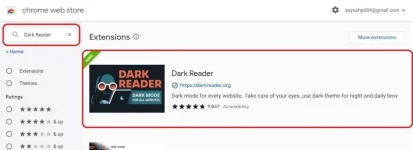
Step 2: Inside the chrome web store use the search bar to search for an browse extension called as Dark Reader and install it.
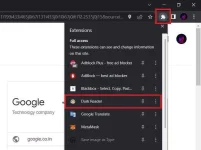
Step 3: Once installed click on the Puzzle icon that can be found by the upper right corner of the chrome window, the select Dark Reader. This opens the Dark Reader menu.
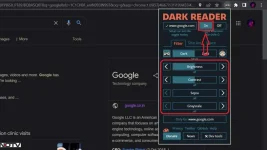
Step 4: Now once you’ve opened the extension UI click on the button that says on and you will see that any website you’ve opened instantly turns dark. Additionally, you can use any of the slider in the Dark Reader menu to control the intensity, greyscale, contrast and brightness of the dark mode as per your preference.
That’s pretty much how you can enable dark mode on any website in Google Chrome and protect your eyes from being seared with bright white light, especially in dark environments.
Source: You do not have permission to view the full content of this post. Log in or register now.


