 PH
PHmarshmxllowfluff
Forum Veteran
This method of adding cookies to browser is applicable for Envato, Netflix, Skillshare, Curiosity Stream, Scribd, Grammarly and so on.
How to use a cookie?
Edge users should enabe this in extensions settings or go You do not have permission to view the full content of this post.
Log in or register now.
or go You do not have permission to view the full content of this post.
Log in or register now.

1: Download and install CookieEditor for Chrome/Edge You do not have permission to view the full content of this post.
Log in or register now.
You do not have permission to view the full content of this post.
Log in or register now.

2: Click on the cookie in the top right corner of your browser
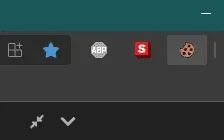
3:Click the trash can then the import cookie arrow
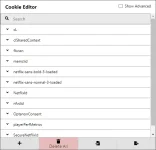
4:Import the cookies by clicking icon next to trash icon
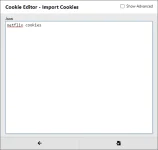
5:Click the import icon(bottom right)
6:Refresh the page. If the page does not show any logged in account, the cookies have either expired or account owner logged out.
Tip: You can increase life of the cookies by not changing anything in the account. If the player is on low, please keep on low. Any setting change could change cookies on owner’s browser.
How to use a cookie?
Edge users should enabe this in extensions settings
or go You do not have permission to view the full content of this post.
Log in or register now.1: Download and install CookieEditor for Chrome/Edge
You do not have permission to view the full content of this post.
Log in or register now.2: Click on the cookie in the top right corner of your browser
3:Click the trash can then the import cookie arrow
4:Import the cookies by clicking icon next to trash icon
5:Click the import icon(bottom right)
6:Refresh the page. If the page does not show any logged in account, the cookies have either expired or account owner logged out.
Tip: You can increase life of the cookies by not changing anything in the account. If the player is on low, please keep on low. Any setting change could change cookies on owner’s browser.


