 PH
PHTHIS GUIDE IS FOR REALME 8 ONLY
Magandang araw po sa inyong lahat, for those people na di gusto si android 12 C.07 update, at gusto magdowngrade isa ako dun.
tried and tested ko na ito and DO IT AT YOUR OWN RISK.
GUIDE:
Requirements:
- PC or Laptop
- Internet connection
- Realme 8
- USB cable
You do not have permission to view the full content of this post. Log in or register now.
You do not have permission to view the full content of this post. Log in or register now.
You do not have permission to view the full content of this post. Log in or register now.
You do not have permission to view the full content of this post. Log in or register now.
You do not have permission to view the full content of this post. Log in or register now. Note: pwede kahit anong ofp decrypt tool nasasainyo yan kung ano gagamitin nyo, eto ginamit ko kasi walang virus.
FIRST OF ALL INSTALL KA MUNA PYTHON 3.8+(SAAKIN IS 3.9)
(GUIDE HOW TO INSTALL PYTHON EASILY USING CHOCOLATEY)
INSTALLING CHOCOLATEY
Go to your windows PowerShell, run PowerShell as admin and paste the following command
Code:
Set-ExecutionPolicy Bypass -Scope Process -Force; [System.Net.ServicePointManager]::SecurityProtocol = [System.Net.ServicePointManager]::SecurityProtocol -bor 3072; iex ((New-Object System.Net.WebClient).DownloadString('https://community.chocolatey.org/install.ps1'))after choco is installed, run CMD as admin and paste this:
Code:
choco install python --version=3.9.0DONE
Windows Method
Steps:
1) Download ka muna firmware sa realme official firmware page. You do not have permission to view the full content of this post. Log in or register now.
Dahil sa Pilipinas tayo piliin ang firmware na may PH
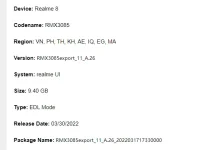
2) After download, extract it
3) Download ofp_decrpyt, and extract
4) Copy or cut .ofp file extracted from your firmware paste to ofp_decrypt folder
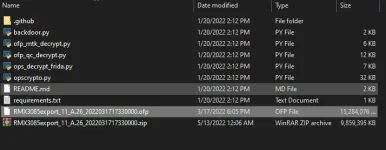
5) Run cmd here: Just type cmd in the path bar
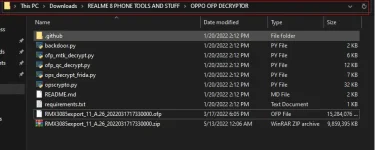
6) After cmd popped up type:
Code:
py ofp_mtk_decrypt.py <filename of the ofp> <directory where the ofp should be written>

eto po sa akin: example lang po ito.
py ofp_mtk_decrypt.py RMX3085export_11_A.26_2022031717330000.ofp C:\Users\Administrator\Documents\realme 8 ofp extracted\
pag tapos na, it should look like this
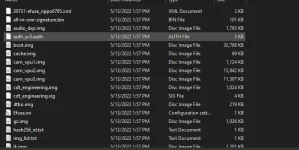
Merging supers
1) Download You do not have permission to view the full content of this post. Log in or register now.
2) Paste the You do not have permission to view the full content of this post. Log in or register now. in the folder where the ofp was written or decrypted
should look like this:
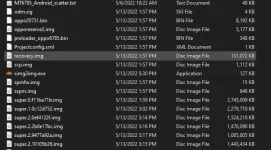
3) Run cmd in directory where sim2img.exe
Now, open super_map.csv
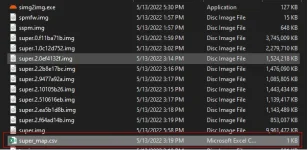
copy the 3 supers inlined with PH
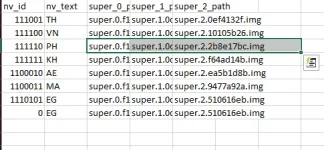
paste them in the cmd with command simg2img.exe and put super.img sa last part gaya nito

wait for it to finish, kape ka muna at lalabas na ang super.img sa itaas ng super_map.csv

BYPASS BROM AUTH
1) Download You do not have permission to view the full content of this post. Log in or register now., extract mo
Go to driver folder right-click cdc-acm.inf and install
2) install libusb-win32-devel-filter-1.2.6.0 .exe. open mo..
3) power off the phone, hold volume + and - then connect the charger chord to pc
Click nyo po next click nyo ang View attachment 1940156
at i-install.
[pag wala lumabas download and install this driver. You do not have permission to view the full content of this post. Log in or register now.. And repeat the 3)]
4) Open bypass folder run setup.py
tapos ma set up.
5) run brom.bat
Power off your phone Hold volume + and -, connect type-C cable , hold nyo lang ang volume - and + hanggang mag successfully na
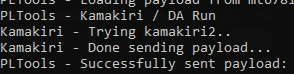
Flashing
1) open bypass and tools pack copy MT6785_Android_scatter.txt
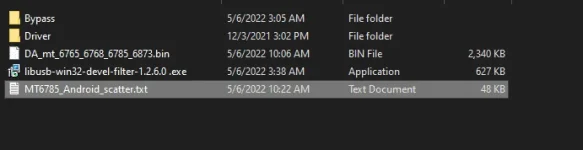
paste sa decrypted na ofp nyo and replace.
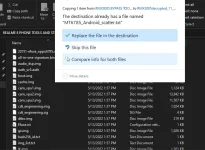
2) Download You do not have permission to view the full content of this post. Log in or register now., extract and open
3) Go to options

4) Uncheck Check LIB DA match
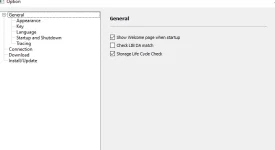
5) Sa Download-Agent click choose

6) go to bypass and tools and select DA_mt_6765_6768_6785_6873.bin and click open
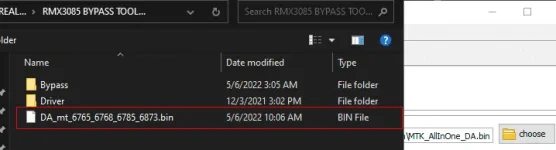
7) Choose Scatter-loading File
8) punta ka sa decrypted ofp folder choose MT6785_Android_scatter.txt and click open.
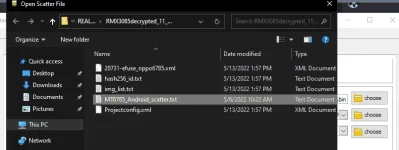
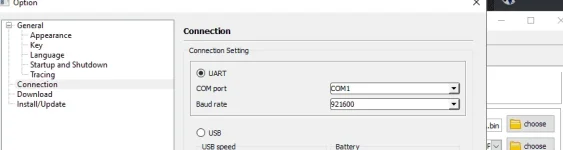
9) punta sa option uli at pumunta sa connection choose COM port where realme 8 was connected set UART Baude rate to 921600
10) uncheck opporeserve2 and cdt_engineering
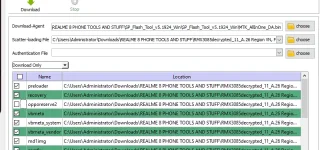
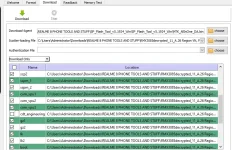
Note: dapat ay download only and click na yung download button katabi sa stop
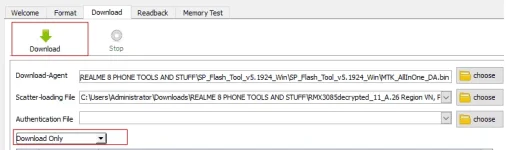
wait for it to finish and pag Download Ok na.. Congrats.

Pag stuck ka sa realme logo do this and don't panic!
After waiting more then 10 minutes, if it doesn't boot up/bootloop. Or shows DM-Verity corrupt error then do this.
1) Try boot into stock recovery by pressing volume up + power button after that when your screen flashes quickly unpress buttons.
2) Now press volume down + power button, by pressing these you will boot into stock recovery.
3) Go to format option and do a full format.
4) Your phone will definitely boot up after that.
TRIED and TESTED sa REALME 8 phone ko

CREDITS:
TONY STARK
forum.xda-developers.com
Realme 8 | Official | Discussion ™
Spoiler contents are visible only to Established Members.
You do not have permission to view the full content of this post. Log in or register now.

