PH
PH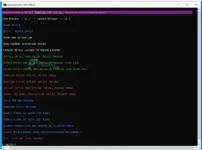
ENJOY PO PARA SA EXPIRED YUNG MSOFFICE Ac†ïvâ†ør NALANG DOWNLOAD NYO
Free Download Office(R)Tool standalone offline installer for Windows. It is an advanced tool to install, activate, and config MS Office 2016, 2019, and 2021.
Overview of Office R Tool
An advanced tool to install, activate, and config MS Office 2016, 2019, and 2021.Features of Office(R)Tool
- Scrub Office
- Reset — Repair Office
- Start KMS Activation
- Show Current Activation Status
- Convert Retail License To Volume License
- Install Office From Online Install Package
- Create Office Online Web-installer Package Setup File
- Create Office Online Web-installer Language Pack Setup File
- Download Office Offline Install Image
- Download Office Offline Install Package
- Install Office From Offline Install Package-image
- Create Iso Image From Offline Install Package-image
- Check For New Version
- Download Latest Release
- Enable Visual Ui[with Ltsc Logo]
- Enable Visual Ui[with 365 Logo]
- Disable Acquisition And Sending Of Telemetry Data
- Change Office Update-path (switch Distribution Channel)
Technical Details and System Requirements
- Supported OS: Windows 11, Windows 10, Windows 8.1, Windows 7
- RAM (Memory): 2 GB RAM (4 GB recommended)
- Free Hard Disk Space: 200 MB or more
You do not have permission to view the full content of this post. Log in or register now.
PASS 123