🔒 Closed QueenCee VPN V3 ( All Networks )

Status
Not open for further replies.
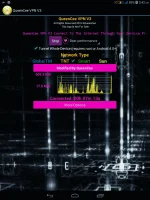
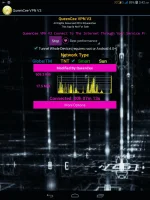
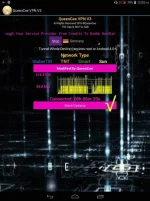
Noob question, san po makikita yong "more options"?

Yong device po n sinubukan ko ay galaxy young. Hanggang sa connected/disconnected lang po kasi yong screen. Wla yong more options.
SlPqfGL.webp
serhine It should be seen just below the the Connected / Disconnected.
Your Samsung Young screensize is only about 3.2 inches if I'm not mistaken.
 
jer_95 I have not tested it on torrent though. Let us wait for feedbacks if they have downloaded completely and succesfully via torrent using the kind of VPNs we have here.
Please be aware that the VPNs we share here runs on Free Mobile Data Internet. There are certain grounds free things cannot access.
THANK you for that info sir, I already tried it in IDM and its okay... hehe
 
Thumbs up po dito. Napagana ko siya sa globe :) kaso sa smart hindi :( may advice po ba kayo?
Keep up the good work queen :)
nirojezmel06 You are most welcome and thank you for the positive feedback. Good news for Globe users.

About Smart sim network...have you tried this :

For a "No Promo Registration" or
for a better connection you can register to :
FREEWIKI to 5555
(It still works for Smart ; it just needs a balance of 1 Peso)
Use Default APN
 
nirojezmel06 You are most welcome and thank you for the positive feedback. Good news for Globe users.

About Smart sim network...have you tried this :

For a "No Promo Registration" or
for a better connection you can register to :
FREEWIKI to 5555
(It still works for Smart ; it just needs a balance of 1 Peso)
Use Default APN

Yes ma'am. I've already tried it and I'm already registered. Akala ko nga po ok na nun. Hehe. Maybe try ko na lang po ulit pagpalit palitin yung servers. Pero natry ko na din yun. Nagtataka lang po ako kase ok naman yung free data nung sim ko.
 
Di ko po ma open ung vpn ko sa sony xperia c5ultra "file format not recognize". Ano po dapat gawin? Thankrg
joebest98
The file is safe and ready to install just :
Please locate your downloaded apk file on your File Manager or folders. Then install.
Also, if it does not install after doing so, you may have another modded app on your cp that is not Psiphon.
I would recommend that you uninstall that file before proceeding.
Goodluck.
 
joebest98
The file is safe and ready to install just :
Please locate your downloaded apk file on your File Manager or folders. Then install.
Also, if it does not install after doing so, you may have another modded app on your cp that is not Psiphon.
I would recommend that you uninstall that file before proceeding.
Goodluck.
Thanks mam...i got it! Great help for me...
 
xTz26oT.webp

HB3vc0v.webp

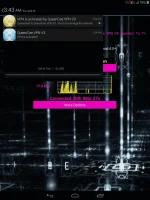
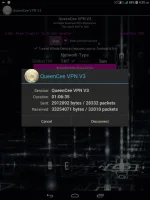
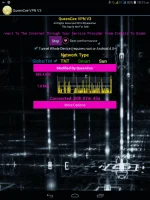
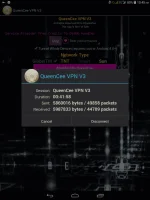
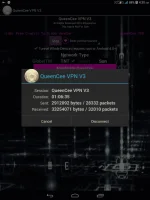
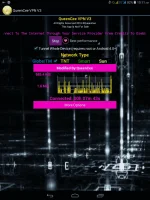
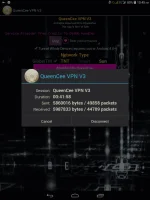
Let us take a look what is inside QueenCee VPN V3...

Sim in use - Talk n Text


N8ITUN3.webp

9A12oLC.webp

lLPRrNH.webp

0HCgiTi.webp

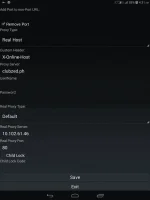
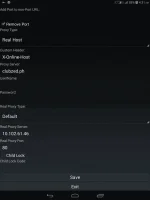
And now for the Settings and Proceedures...


QueenCee VPN V3 For Talk n Text

Use Default APN

Remove Port : Check
Proxy Type : Real Host
Proxy Server : Choose one below

You do not have permission to view the full content of this post. Log in or register now.
203.174.14.199

Real Proxy Type : Default
Real Proxy Server : Choose one below

115.85.26.8
110.3.114.243
220.83.91.45
183.111.169.202
221.131.112.123
10.102.61.46
14.3.167.193
127.69.79.119
210.165.245.132
104.131.28.28

Real Proxy Port : 80/8080


QueenCee VPN V3 For Smart

For a "No Promo Registration" or
for a better connection you can register to :
FREEWIKI to 5555
(It still works for Smart ; it just needs a balance of 1 Peso)

Use Default APN

Handler Settings For Smart

Front Query: You do not have permission to view the full content of this post. Log in or register now.
MiddleQuery: Leave blank
BackQuery: You do not have permission to view the full content of this post. Log in or register now.
Filter: You do not have permission to view the full content of this post. Log in or register now.
Add Port to non-port URL: 1080/8555
Remove Port: Check
Proxy Type: Real Host/Host
Custom Header: X-Online-Host
Proxy Server: Choose one

You do not have permission to view the full content of this post. Log in or register now.

Real Proxy Type: Default/Http/Socks
Real Proxy Server: Choose one

127.0.0.1
127.8.8.1
10.24.56.10
43.255.114.140
203.93.97.24
210.165.245.132
Real Proxy Port: 80/8080
SAVE


QueenCee VPN V3 For Sun
Use Default APN

Handler Settings For Sun

Remove Port : Check
Proxy Type : Real Host
Proxy Server : Choose one

You do not have permission to view the full content of this post. Log in or register now.

Real Proxy Type : Default
Real Proxy Server : Choose one

110.3.114.243
220.83.91.45
183.111.169.202
221.131.112.123
10.102.61.46
14.3.167.193
127.69.79.119
210.165.245.132
104.131.28.28

Real Proxy Port : 80/8080
SAVE

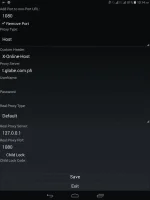
Sim in use - Globe

OyTfijO.webp


PC0UChE.webp

tx1PV2W.webp

MRYdYZ9.webp


QueenCee VPN V3 For Globe / TM
MGC APN Phone Setting

Create APN MGC on your phone.
To those who have no idea on how to do it
on an Android phone, you may follow these steps...

1. Settings
2. More
3. Mobile Network
4. Access Point Name
5. Choose Globe Telecom
6. Choose myGlobe Connect
7. Name: my Globe connect
8. APN: You do not have permission to view the full content of this post. Log in or register now.
9. PROXY: 203.177.42.214 or 108.67.222.222
10. PORT 8080

QueenCee VPN V3
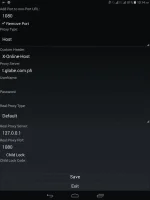
Handler Settings For Globe / TM

Add Port to non Port URL: 1080
Remove port: Check
Proxy Type: Host
Custom Header: X-Online-Host

Proxy Server choose

libre.ph
m.globe.com.ph
You do not have permission to view the full content of this post. Log in or register now.

125.5.112.173
203.177.154.220
209.170.97.175
203.177.57.231

Real Proxy Type: Default/Inject/Socks
Real Proxy Server: Choose one

127.0.0.1
127.8.8.1
126.150.113.196

Real Proxy Port: 1080/1614

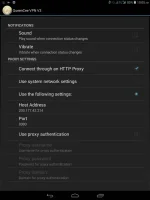
More Option

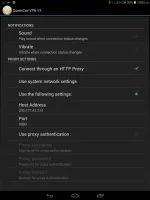
Connect trough an HTTP proxy: Check
Use the Following settings: Check
Host Address: 203.177.42.214
Port: 8080


And now for the DOWNLOAD links...

You do not have permission to view the full content of this post. Log in or register now.

You do not have permission to view the full content of this post. Log in or register now.

Thanks
xTz26oT.webp

HB3vc0v.webp

Let us take a look what is inside QueenCee VPN V3...

Sim in use - Talk n Text


N8ITUN3.webp

9A12oLC.webp

lLPRrNH.webp

0HCgiTi.webp

And now for the Settings and Proceedures...


QueenCee VPN V3 For Talk n Text

Use Default APN

Remove Port : Check
Proxy Type : Real Host
Proxy Server : Choose one below

You do not have permission to view the full content of this post. Log in or register now.
203.174.14.199

Real Proxy Type : Default
Real Proxy Server : Choose one below

115.85.26.8
110.3.114.243
220.83.91.45
183.111.169.202
221.131.112.123
10.102.61.46
14.3.167.193
127.69.79.119
210.165.245.132
104.131.28.28

Real Proxy Port : 80/8080


QueenCee VPN V3 For Smart

For a "No Promo Registration" or
for a better connection you can register to :
FREEWIKI to 5555
(It still works for Smart ; it just needs a balance of 1 Peso)

Use Default APN

Handler Settings For Smart

Front Query: You do not have permission to view the full content of this post. Log in or register now.
MiddleQuery: Leave blank
BackQuery: You do not have permission to view the full content of this post. Log in or register now.
Filter: You do not have permission to view the full content of this post. Log in or register now.
Add Port to non-port URL: 1080/8555
Remove Port: Check
Proxy Type: Real Host/Host
Custom Header: X-Online-Host
Proxy Server: Choose one

You do not have permission to view the full content of this post. Log in or register now.

Real Proxy Type: Default/Http/Socks
Real Proxy Server: Choose one

127.0.0.1
127.8.8.1
10.24.56.10
43.255.114.140
203.93.97.24
210.165.245.132
Real Proxy Port: 80/8080
SAVE


QueenCee VPN V3 For Sun
Use Default APN

Handler Settings For Sun

Remove Port : Check
Proxy Type : Real Host
Proxy Server : Choose one

You do not have permission to view the full content of this post. Log in or register now.

Real Proxy Type : Default
Real Proxy Server : Choose one

110.3.114.243
220.83.91.45
183.111.169.202
221.131.112.123
10.102.61.46
14.3.167.193
127.69.79.119
210.165.245.132
104.131.28.28

Real Proxy Port : 80/8080
SAVE

Sim in use - Globe

OyTfijO.webp


PC0UChE.webp

tx1PV2W.webp

MRYdYZ9.webp


QueenCee VPN V3 For Globe / TM
MGC APN Phone Setting

Create APN MGC on your phone.
To those who have no idea on how to do it
on an Android phone, you may follow these steps...

1. Settings
2. More
3. Mobile Network
4. Access Point Name
5. Choose Globe Telecom
6. Choose myGlobe Connect
7. Name: my Globe connect
8. APN: You do not have permission to view the full content of this post. Log in or register now.
9. PROXY: 203.177.42.214 or 108.67.222.222
10. PORT 8080

QueenCee VPN V3
Handler Settings For Globe / TM

Add Port to non Port URL: 1080
Remove port: Check
Proxy Type: Host
Custom Header: X-Online-Host

Proxy Server choose

libre.ph
m.globe.com.ph
You do not have permission to view the full content of this post. Log in or register now.

125.5.112.173
203.177.154.220
209.170.97.175
203.177.57.231

Real Proxy Type: Default/Inject/Socks
Real Proxy Server: Choose one

127.0.0.1
127.8.8.1
126.150.113.196

Real Proxy Port: 1080/1614

More Option

Connect trough an HTTP proxy: Check
Use the Following settings: Check
Host Address: 203.177.42.214
Port: 8080


And now for the DOWNLOAD links...

You do not have permission to view the full content of this post. Log in or register now.

You do not have permission to view the full content of this post. Log in or register now.

Thanks for Sharing this Ms. |©
 
Status
Not open for further replies.

About this Thread

  • 993
    Replies
  • 108K
    Views
  • 368
    Participants
Last reply from:
Gabriel ern

Online now

Members online
1,172
Guests online
1,184
Total visitors
2,356

Forum statistics

Threads
2,272,483
Posts
28,943,014
Members
1,237,220
Latest member
hergs
Back
Top