 PH
PHMost users of computers, smartphones, and other technology deployments ignore many functions of these devices and the proper methods to protect the information they contain, demonstrating the lack of efficient You do not have permission to view the full content of this post.
Log in or register now. campaigns.
There are many threat actors who try to take advantage of this little knowledge for their own purposes, so it is necessary for users to become more familiar with this kind of topics, gradually knowing some computer tools and their capabilities.
This time, cyber security awareness experts from the International Institute of Cyber Security You do not have permission to view the full content of this post. Log in or register now. will show you USB Raptor, a program that allows you to prepare a USB drive specially designed to unlock a computer when connecting it and lock it when removing the device from the USB port.
As usual, we remind you that this article was prepared for informational purposes and should not be taken as a call to action, so IICS is not responsible for the misuse that may be given to the information contained herein.
Before you begin, consider these steps:
.Net Framework 4.0 is required to run the program
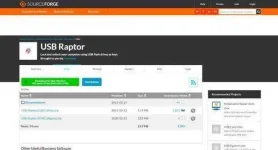
The tool must be downloaded from SourceForge
LAUNCH
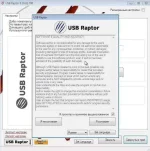
At this stage, we can set the interface language settings and accept the license agreement, mention cyber security awareness experts.
CONFIGURATION
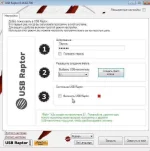
In order not to get into complications, after launching the tool we can open the option of quick settings, set a password and start using USB Raptor as soon as possible.
In this step, we should also indicate the letter of the flash drive on which the unlock file is created. The last check mark is to activate the blocking service.
LOCK THE SCREEN
After removing the USB flash drive and activating the program, we will see the following window. There is no default password entry window, it appears when you double-click with the mouse, cyber security awareness experts point out. If you connect a special USB flash drive, the system will be unlocked.

Of course, the lock screen is not very good, but it can be customized in the advanced settings. In the same place, record the automatic startup of the service when the operating system starts. You can disable the network unlock feature with password or batch, leaving only USB unlock.
While the app may crash depending on the operating system it’s used on due to an apparent configuration change, generally speaking USB Raptor works quite well and can be functional for many users.
To learn more about information security risks, cyber security awareness, malware variants, vulnerabilities and information technologies, feel free to access the International Institute of Cyber Security (IICS) websites.
There are many threat actors who try to take advantage of this little knowledge for their own purposes, so it is necessary for users to become more familiar with this kind of topics, gradually knowing some computer tools and their capabilities.
This time, cyber security awareness experts from the International Institute of Cyber Security You do not have permission to view the full content of this post. Log in or register now. will show you USB Raptor, a program that allows you to prepare a USB drive specially designed to unlock a computer when connecting it and lock it when removing the device from the USB port.
As usual, we remind you that this article was prepared for informational purposes and should not be taken as a call to action, so IICS is not responsible for the misuse that may be given to the information contained herein.
Before you begin, consider these steps:
.Net Framework 4.0 is required to run the program
The tool must be downloaded from SourceForge
LAUNCH
At this stage, we can set the interface language settings and accept the license agreement, mention cyber security awareness experts.
CONFIGURATION
In order not to get into complications, after launching the tool we can open the option of quick settings, set a password and start using USB Raptor as soon as possible.
In this step, we should also indicate the letter of the flash drive on which the unlock file is created. The last check mark is to activate the blocking service.
LOCK THE SCREEN
After removing the USB flash drive and activating the program, we will see the following window. There is no default password entry window, it appears when you double-click with the mouse, cyber security awareness experts point out. If you connect a special USB flash drive, the system will be unlocked.
Of course, the lock screen is not very good, but it can be customized in the advanced settings. In the same place, record the automatic startup of the service when the operating system starts. You can disable the network unlock feature with password or batch, leaving only USB unlock.
While the app may crash depending on the operating system it’s used on due to an apparent configuration change, generally speaking USB Raptor works quite well and can be functional for many users.
To learn more about information security risks, cyber security awareness, malware variants, vulnerabilities and information technologies, feel free to access the International Institute of Cyber Security (IICS) websites.