 PH
PHSa mga di papo alam paano i edit po yung Local Account Administrator Name sa laptop or pc nyu po.
Note: Working po Windows 10
pa try nalang po sa ibang windows.
First:
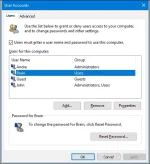
Press Windows key + R, type: control userpasswords2, then hit Enter. Select the user you want to edit then click properties.
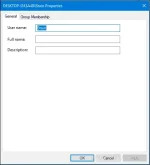
Select the General tab, then enter the user name you want to use. Click Apply then OK, click Apply then OK again to confirm the change.
Done
Sana Po Makatulong
Note: Working po Windows 10
pa try nalang po sa ibang windows.
First:
Press Windows key + R, type: control userpasswords2, then hit Enter. Select the user you want to edit then click properties.
Select the General tab, then enter the user name you want to use. Click Apply then OK, click Apply then OK again to confirm the change.
Done
Sana Po Makatulong
 , sanaol may brain talaga ahhaha