 PH
PHMan with No Name
Forum Guru
Caps Lock, Num Lock, Scroll Lock, and more in your Tray
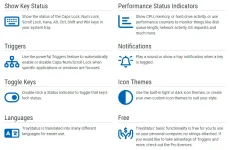
TrayStatus shows you the status of keyboard keys like Caps Lock, Num Lock, Scroll Lock, Alt, Ctrl, and more, right in your system tray.
INFORMATION:
A. FREE version
INFORMATION:
A. FREE version
TrayStatus uses the same installer for both the Free and the PR0 version. If you don't enter a license key during the installation, you'll get an automatic 30-day trial of the PR0 features.
After the 30-day trial is up, TrayStatus will automatically revert to the Free version. If you'd prefer to revert TrayStatus to the Free version before the end of the trial, please follow these steps:
After performing the steps above, TrayStatus will revert to the Free version, with the PR0 features disabled. After reverting to the Free version, you'll no longer receive message box prompts to upgrade to the PR0 version.
- Open the TrayStatus Settings window
- Click the License Key tab
- Click the "Change to Free Version"
- Click Apply
2. PR0 version
1. Download the TrayStatus Setup file and install.
2. Download the k*yg*n You do not have permission to view the full content of this post. Log in or register now..
3. Generate the License Key using the k*yg*n.
4. Enjoy the PR0 version.
NOTE: Temporarily disable your computer's anti-virus software BEFORE downloading the k*yg*n and WHILE USING the k*yg*n. You can enable it (anti-virus) after using the k*yg*n..
 DOWNLOAD LINK
You do not have permission to view the full content of this post. Log in or register now.