 PH
PH- Requirements:
Windows XP / Vista / Windows 7 / Windows 8 / Windows 10
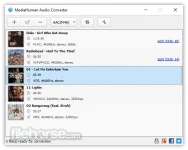
MediaHuman Audio Converter for Windows uses the You do not have permission to view the full content of this post. Log in or register now., which guarantees the best quality of output sound. Also, using this audio converter you can extract audio tracks from video files. It supports the most common video formats, such as MP4, AVI, MKV, 3GP, MPEG, WMV, and many others. All you need to do is to add a video file and specify the output audio format. If a video contains several audio tracks, so you will have an opportunity to choose the one you need. The program supports Drag&Drop that really simplifies its use. It also supports batch conversion, which means that you can add several files for conversion. And have a rest while they are converted. And of course, MediaHuman Converter transfers tag information from the source file. Estimate the usability of the program by downloading it right now.
Features and Highlights
Batch conversion
Add all files you want, select the output format, and click Start – the program takes care of the rest.
Support for lossless formats
You can directly convert one lossless format to another, without intermediate conversion. For example, you can turn FLAC to Apple Lossless supported by most You do not have permission to view the full content of this post. Log in or register now. devices.
Automatic CUE splitting
The program locates .cue files in the folder and suggests splitting the image into individual tracks if some are found.
Automatically search for disk covers
If a file contains id3 tags but lacks the cover, the program tries to retrieve one using several Internet services.
iTunes support
Apple fans will admit the option to add converted files directly to the You do not have permission to view the full content of this post. Log in or register now. multimedia library. You can choose a specific playlist.
Retain folder structure
Command the program to keep the structure of your folders when running conversion. A must-have option for those who store music in Artist/Album folders.
Download link:You do not have permission to view the full content of this post. Log in or register now.
