PH
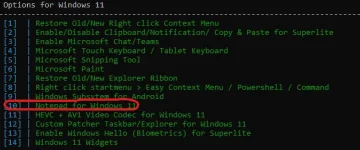
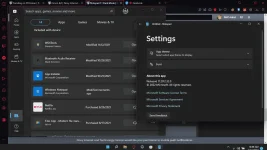
PHSa ngayon, available lang ito as preview para sa insider version ng Windows 11 pero may work around para mainstall ito sa non insider version
NOTE: hindi ito akin, may mga long version kayo na makikita sa yt pero itong tutorial na ito eh shortcut na para tapos agad ang boksing.
DISCLAIMER: I will not be held responsible kung magloko yang pc nyo, kung hindi kayo power user ng pc then I might as well suggest na hintayin nyo na lang ma-roll out officially yang notepad na yan probably sa windows update lalabas yan but who knows when.
So here we go kung interesado kayo:
1.) create muna kayo ng system restore point para kung sakali hindi nyo magustuhan eh maka-revert kayo sa old version nun notepad
2.) after na maka-create kayo ng restore point, punta kayo sa settings then enable developer mode
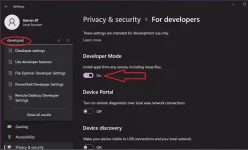
3.) download this >>> You do not have permission to view the full content of this post. Log in or register now. extract nyo sa folder na hindi nyo masyado ginagalaw, ang sa akin eh sa C:\Windows ko na mismo nilagay kasi hindi pwede idelete yan, hindi gagana yung notepad pag dinelete yan
4.) Uninstall nyo muna yung current version nyo ng notepad:
Run Windows Terminal as admin,
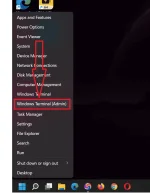
eto command sa pag uninstall - just copy paste sa terminal window nyo:
Get-AppxPackage -allusers notepad | Remove-AppxPackage -AllUsers
5.) Install yung notepad 11 app, punta kayo kung saan nyo inextract na folder yung app...
Right click nyo yung "AppxManifest.xml" then "copy as path"
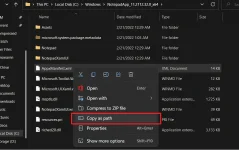
in my case sa windows folder ko inilagay kaya ganito ang command sa akin:
Add-AppxPackage -Register "C:\Windows\NotepadApp_11.2112.32.0_x64\AppxManifest.xml"
6.) Restart!
Kung sakaling nawala yung "New Text Document" sa right click context menu, apply nyo lang itong fix >>> You do not have permission to view the full content of this post. Log in or register now. extract, double click the reg file and merge the content of the reg file then restart again
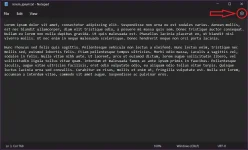
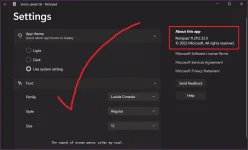
Eto sya after successful installation:
NOTE: hindi ito akin, may mga long version kayo na makikita sa yt pero itong tutorial na ito eh shortcut na para tapos agad ang boksing.
DISCLAIMER: I will not be held responsible kung magloko yang pc nyo, kung hindi kayo power user ng pc then I might as well suggest na hintayin nyo na lang ma-roll out officially yang notepad na yan probably sa windows update lalabas yan but who knows when.
So here we go kung interesado kayo:
1.) create muna kayo ng system restore point para kung sakali hindi nyo magustuhan eh maka-revert kayo sa old version nun notepad
2.) after na maka-create kayo ng restore point, punta kayo sa settings then enable developer mode
3.) download this >>> You do not have permission to view the full content of this post. Log in or register now. extract nyo sa folder na hindi nyo masyado ginagalaw, ang sa akin eh sa C:\Windows ko na mismo nilagay kasi hindi pwede idelete yan, hindi gagana yung notepad pag dinelete yan
4.) Uninstall nyo muna yung current version nyo ng notepad:
Run Windows Terminal as admin,
eto command sa pag uninstall - just copy paste sa terminal window nyo:
Get-AppxPackage -allusers notepad | Remove-AppxPackage -AllUsers
5.) Install yung notepad 11 app, punta kayo kung saan nyo inextract na folder yung app...
Right click nyo yung "AppxManifest.xml" then "copy as path"
in my case sa windows folder ko inilagay kaya ganito ang command sa akin:
Add-AppxPackage -Register "C:\Windows\NotepadApp_11.2112.32.0_x64\AppxManifest.xml"
6.) Restart!
Kung sakaling nawala yung "New Text Document" sa right click context menu, apply nyo lang itong fix >>> You do not have permission to view the full content of this post. Log in or register now. extract, double click the reg file and merge the content of the reg file then restart again
Eto sya after successful installation: