 PH
PH-Plastic Foods-
Established
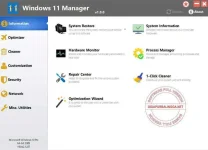
Features Of Windows 11 Manager Full Version
- Information
- Creates the system restore point manually; Gets detailed information about your system and hardware, helps you find out the Microsoft product key such as Microsoft Windows and Microsoft Office
- Optimizer
- Tweaks your system to improve performance and increase speed
- Cleaner
- Disk Analyzer can analyze and view the disk space usage of all programs, files and folders find out which engross your disk space and shown with a chart
- customization
- Customizes system parameters according to your preferences by tweaking File Explorer, Desktop, Start, Taskbar and Notification area
- Security
- Tweaks system, components, UAC, Sign in settings, adjusts various settings and restricts access to drives and programs to improve system security
- Network
- Optimizes and tweaks your internet connection and network settings
- Misc. Utilities
- Creates scheduled tasks or the monitorings that trigger tasks
How to Install
- Download and extract this “Windows 11 Manager Full Version” file.
- Also extract the keygen file that is in the folder.
- Open the keygen folder, then run the keygen file by right-clicking >> run as administrator.
- Click Generate.
- Install the program as usual and use the serial in the keygen for the registration process.
- Done.
You do not have permission to view the full content of this post. Log in or register now.