 PH
PH Requirements:
Windows 7 / Windows 7 64 / Windows 8 / Windows 8 64 / Windows 10 / Windows 10 64
WhyNotWin11 is a lightweight system information app that can inform users whether or not their desktop or laptop PC satisfying the system requirements needed for the installation of Windows 11, the latest version of the popular operating system made by Microsoft Corporation. While the official hardware You do not have permission to view the full content of this post. Log in or register now. exists, developers from You do not have permission to view the full content of this post. Log in or register now. have decided to simply offer a Yes/No prompt to the compatibility query by the user. On the other hand, this fast and reliable open-source application clearly showcases all hardware requirements and lists what items did user fail or succeed on.
WhyNotWin11 is distributed online as an executable file optimized only for You do not have permission to view the full content of this post. Log in or register now. and it has no automated installer. Therefore, users can simply download it and place it either on their local storage or portable USB drive. Since this application requires access to the central sections of the OS and tries to perform a diagnostic pass on the motherboard, users will first have to grant this app administrative privilege start. To do so, they simply need to right-click on the WhyNotWin11.exe file and select the “Run as administrator” option. Otherwise, Windows 10 will prompt the user that this application has no official certification and cannot be run.
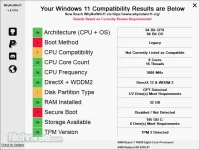
Once up and running, WhyNotWin11 showcases a simple dashboard with the eleven most crucial hardware requirements that the desktop and laptop PCs must pass in order to be able to install Windows 11. These requirements cover CPU architecture, Boot method, CPU compatibility, CPU core count, CPU frequency, DirectX12 compatibility, Disk partition type, RAM size, presence of Secure boot, TPM version, and amount of available storage.
Windows 11 Minimum Requirements- Processor: 1 gigahertz (GHz) or faster with 2 or more cores on a compatible 64-bit processor or System on a Chip (SoC)
- Memory: 4 GB RAM
- Storage: 64 GB or larger storage device
- System firmware: UEFI, Secure Boot capable
- TPM: Trusted Platform Module (TPM) version 2.0
- Graphics Card: DirectX 12 compatible graphics / WDDM 2.x
- Display: >9” with HD Resolution (720p)
- Internet connection: Microsoft account and internet connectivity required for setup for Windows 11 Home
WhyNotWin11 is a reliable tool that can help anyone check if their Windows 10 PC is ready to be upgraded to Windows 11. The app is 100% FREE and receives regular updates.
What's new in this version:WhyNotWin11 2.4.3.1
- Fixes Crash if Languages or Themes do not exist
- Code Cleanup
- Added Basic Settings Menu
- Improved Disk Detection and Info (Credit @htcfreek)
- Improved DirectX Check Performance
- Added Guides for Common Questions
- Fixed Storage Space Check for GiB vs GB
- Fixed DPI Scaling Code on Some Devices
- Fixed Ryzen 5 1600 AF detection and reporting
- Added reporting of TPM Device Driver Error State
- Added Latest Intel and AMD Supported CPUs to CPU Lists
- Fixed Regression where TPM 1.2 was marked as Compatible
- Added GPO Registry Values to Control the Appearance of WhyNotWin11 (more coming soon)
Download link:You do not have permission to view the full content of this post. Log in or register now.

 ...
... .
. keep sharing

