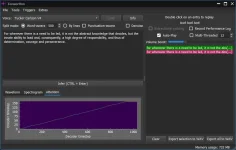
PH
PH
You do not have permission to view the full content of this post. Log in or register now.
Balabolka is a Text-To-Speech (TTS) program. All computer voices installed on your system are available to Balabolka. The on-screen text can be saved as an audio file. The program can read the clipboard content, extract text from documents, customize font and background colour, control reading from the system tray or by the global hotkeys. Balabolka supports text file formats: AZW, AZW3, CHM, DjVu, DOC, DOCX, EML, EPUB, FB2, FB3, HTML, LIT, MD, MOBI, ODP, ODS, ODT, PDB, PRC, PDF, PPT, PPTX, RTF, TCR, WPD, XLS, XLSX.
The program uses various versions of Microsoft Speech API (SAPI); it allows to alter a voice's parameters, including rate and pitch. The user can apply a special substitution list to improve the quality of the voice's articulation. This feature is useful when you want to change the spelling of words. The rules for the pronunciation correction use the syntax of regular E×ρréššions.
Balabolka can save the synchronized text in external LRC files or in MP3 tags inside the audio files. When an audio file is played with players on a computer or on modern digital audio players, the text is displayed synchronously (at the same way, as lyrics for songs).
--------------------------------------------------------------------------------------------------------------------------------------------------------------------------------------------------------------------------------
Matagal na itong free TTS GUI to convert text to audio, etc. kaya kailangan din ng basic to advanced TTS engines to function like Microsoft Speech API, Loquendo, AT&T, Nuance, RealVoice, Acapela, atbp. Kailngan ay naka-install ang mga yan sa PC ninyo in order for Balabolka to detect it. Saka ko na ilalagay yung mga extra TTS foreign languages since this thread is for Tagalog TTS seekers.
Since wala pang available na Tagalog TTS engine, we will use the cloud service option of Balabolka. Here's the guide:
Download and extract the portable version.
Open Balabolka GUI and click Tools/Use Online TTS Service.
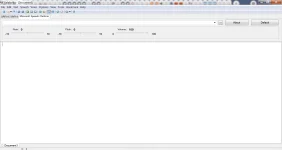
Type your narrated Tagalog text and select the path of your project.
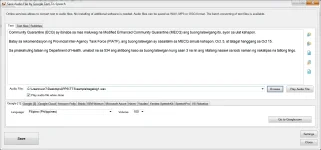
Use either the Google (1) and Google (2) FREE online service to convert your Tagalog narration to Balabolka's supported formats- wav, ogg, mp3. etc.
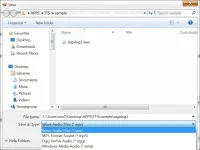
Desente naman yung tunog ng resultang boses. Pero kung meron kayong API key, yung mas high quality TTS ng Google Cloud ang pwede ninyong gamitin.
Sa "Settings" sa babang-kanan ay pwede ninyong ilagay yung proxy server ninyo.
Related lang ito sa sinabi ko rito:
https://phcorner.org/goto/post?id=21001534
Sa android or any mobile platform ay meron namang free service sa Google Cloud TTS or maghanap kayo ng crk versions ng mga mobile aternatives.
...Hope this helps anyone...
-----------------------------------------------------
10/12/2021 UPDATES:
Para madagdagan ng mga extra features yang Balabolka, you can try adding the extra plugins sa mainsite niya - spell checkers, extra SAPI5 engines, skin packs, etc...
To get a commercial package, you try the latest Nuance Dragon Professional. Get in in any one of the two links
Spoiler contents are visible only to Established Members.
To make NVDA full check this link:
Spoiler contents are visible only to Established Members.
Kung di pa kayo kuntento sa Nuance, ilagay ninyo sa Google searchbox ito -
TTS ENGINE ARCHIVE. Sulit ka na sa results like this link: You do not have permission to view the full content of this post. Log in or register now.
Yung fist two link results sa google, nasa inyo na para imbestigahin kung ano yung content since may hint naman sa Balabolka site kung ano mga yon, at base na rin sa nabasa ninyo. Sangkaterbang TTS engines ang nandyan (merong free+crked, old and new, even for android).