 PH
PHgabrielkunn
Forum Guru
yung sleep nagana ... pero yung shut down sa Windows ayaw nya pati sa Alt+F4 pls helpp
dipa paps wait try koAlt cntrl delete na try mona paps?
paps not working namamatay sa power button ng system unit pero sa settings ayaw permanent naba ito?Alt cntrl delete na try mona paps?
%SystemRoot%System32Shutdown.exe -s -t 00 -f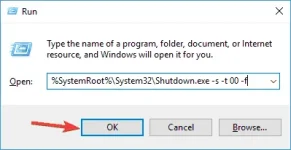
%SystemRoot%System32Shutdown.exe -s -t 00 -f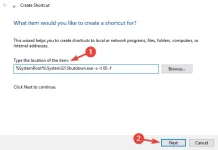
nag install lang po ako kanina ng cryptotab tas ayon dikona ma shut down huhuhubaka may na-install ka na software na nag peprevent ng shutdown ng pc mo?
try kopo sya sir maraming salamat po feedback ako kapag gumanaMay nagalaw ka siguro sa system pag ganyan.
Try mo to.
Use a shutdown command to shutdown your PC
After running this You do not have permission to view the full content of this post. Log in or register now., your PC should shut down. If this command works, you might want to You do not have permission to view the full content of this post. Log in or register now. in order to run this command faster.
- Press Windows Key + R to open the Run dialog.
- When the Run dialog opens, enter this string and press Enter or click OK:
%SystemRoot%System32Shutdown.exe -s -t 00 -f
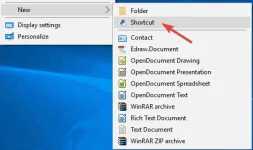
This is rather simple, and you can it by following these steps:
- Right click your Desktop and choose New > Shortcut from the menu.
- In the Type the location of the item field enter this string and click Nextto continue:
%SystemRoot%System32Shutdown.exe -s -t 00 -f
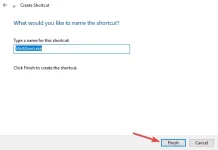
- Change the name of the shortcut if you want and click on Finish.