 PH
PHgive link poMukhang, ma swerte ngayong araw mga ka phc
Eto na yung command writing mtd. Gz
” mtd -r write /tmp/firmware name firmware” [Enter]
firmware upgrade openwrt with putty OpenWrt Firmware upgrading process
While upgrading process going device will show “[W]” in last
firmware upgrade with telnet command in openwrt router
Pwede yung Cp mode dto mga lods, ah yung Andftp, parehas lang pala used sa winscp
Upload Firmware to “tmp” folder in Router Flash.
For upgrading Openwrt firmware from ssh command we have to upload the firmware file into tmp folder of router flash with using of WinSCP. Follow the picture of how to upload OpenWrt firmware file in tmp folder.
1: In the left side-block browse the folder you have saved firmware copy and open the folder.
2: Open “tmp” folder inside router flash as shown below image option number 2.
3: Right-click firmware copy and click upload option to start uploading firmware into router flash.
how to install firmware in openwrt router from ftp
-
Welcome to PHCorner Forums! Sign up for free to unlock full access and exclusive privileges, including:
- Asking questions about computer and mobile issues
- Discovering internet tips for your mobile network and computer
You are using an out of date browser. It may not display this or other websites correctly.
You should upgrade or use an alternative browser.
You should upgrade or use an alternative browser.
PLDT Boosteven R281 (Band Locking)
- Thread starter L E N A R
- Start date
- Status
- Not open for further replies.
give link po
Dto galing lahat yung Tut, Lods. Himalang nahanap via Yt
You do not have permission to view the full content of this post. Log in or register now.
bin pa rin ginamitDto galing lahat yung Tut, Lods. Himalang nahanap via Yt
You do not have permission to view the full content of this post. Log in or register now.
Huwag kang mag flash ng firmware kung di mo alam ang ginagawa mo. 2 ang firmware ng R281. Yung isa sa modem st yung ida sa router. Ang brick sa R281 mo ay modem, therefore ang i flash mo ay ang firmware na galing sa modem. Since wala kang access sa 192.168.8.1, di ka maka flash thru sshgive link po
bin pa rin ginamit
Mtd.gz na yan, Ka phc
sundin ko nalang to since 0 knowledge ako ditoHuwag kang mag flash ng firmware kung di mo alam ang ginagawa mo. 2 ang firmware ng R281. Yung isa sa modem st yung ida sa router. Ang brick sa R281 mo ay modem, therefore ang i flash mo ay ang firmware na galing sa modem. Since wala kang access sa 192.168.8.1, di ka maka flash thru ssh
Correct, kaya nga sabi ni Lenar, nahugot nga di naman maipasok, dahil nga baseband v2.2V ay walang access sa port 22,23 at port 80, sinara na ng PLDT. Kung meron lang matagal ka na sana matulungan.sundin ko nalang to since 0 knowledge ako dito
bwct kasing 0 yun hahaha, makapaghihintay naman master. baka may makatuklas na ng way.Correct, kaya nga sabi ni Lenar, nahugot nga di naman maipasok, dahil nga baseband v2.2V ay walang access sa port 22,23 at port 80, sinara na ng PLDT. Kung meron lang matagal ka na sana matulungan.
bwct kasing 0 yun hahaha, makapaghihintay naman master. baka may makatuklas na ng way.
Paki watch mo rin Yt Vids ka phc, Mtd file yung ira-write, pero isang mtd file lang
https://y
 utu.be/6jXjP3q7-NA
like sa sinabi master ni sir gallium di po pa rin maipapasok yung fw kasi di maaccess yung port para sa .8.1 kaya wala dinPaki watch mo rin Yt Vids ka phc, Mtd file yung ira-write, pero isang mtd file lang
https://y
like sa sinabi master ni sir gallium di po pa rin maipapasok yung fw kasi di maaccess yung port para sa .8.1 kaya wala din
Kahit yung firmware1 lang muna na mtd.gz. bakit sa mga v4 firmwares, wala naman daw laman na firmwares yung 192.168.8.1. Etong mga version 4.2 lang may laman na firmwares sa 192.168.8.1. Yun mismo sabi ni Lodi Ghost(Sya dumokot firmware1 mtd4.gz at yung firmware2 mtd7.gz), goodluck mga ka phc
meron sir na fw sa .8.1 na naishare si master ghostKahit yung firmware1 lang muna na mtd.gz. bakit sa mga v4 firmwares, wala naman daw laman na firmwares yung 192.168.8.1. Etong mga version 4.2 lang may laman na firmwares sa 192.168.8.1. Yun mismo sabi ni Lodi Ghost(Sya dumokot firmware1 mtd4.gz at yung firmware2 mtd7.gz), goodluck mga ka phc
Ang nakikita ko lang na paraan ay mapasok ang port 53, kung merong magaling mag häçk at magkaroon ng shell access or buksan ang unit ang i flash mismo yung rom gamit ang eprom programmer. Or may full firmware at ilagay sa isang proxy server na kunwari galung PLDT at i connect ang wan/lan port ng r281 doon, then ilagay sa ethernet only ang settings ng r281. Para doon siya sa proxy server mag connect at mag update siya using yung firmware na galing sa proxy server, etc, etc.bwct kasing 0 yun hahaha, makapaghihintay naman master. baka may makatuklas na ng way.
meron sir na fw sa .8.1 na naishare si master ghost
Simple kac function yung mdt write ka phc, means pwede I overwrite yung mtd4.gz(firmware1 ) at yung mtd7.gz(firmware2)
Bale ang gagawin overwrite and flash old firmwares dun sa new firmwares pero one by one lang paisa isa din, antay natin mga Masters
Eto na yung command writing mtd. Gz
” mtd -r write /tmp/firmware name firmware” [Enter]
firmware upgrade openwrt with putty OpenWrt Firmware upgrading process
While upgrading process going device will show “[W]” in last
firmware upgrade with telnet command in openwrt router
FYI, ang R281 ay modem router, ang modem marvell ang chipset, ang router ay mediatek. 2 din ang firmware niya, ang openwrt barrier breaker na nasa modem(access thru 192.168.8.1 sa usb yung katabi ng sim, at ang chaos calmer naman ang nasa router. So kung brick ang modem side dapat yung modem side din ang i flash, ang problema close na ang port 22, 23 at 80 ng modem side, so paano ipa flash? In fact kung open lang sana yung mga port na nabanggit ko pwede sana i-flash yung modem side firmware at ma openline ulit, unless magawan ni EugeneKey ng paraan. So wait tayo sa kanya.Simple kac function yung mdt write ka phc, means pwede I overwrite yung mtd4.gz(firmware1 ) at yung mtd7.gz(firmware2)
Bale ang gagawin overwrite and flash old firmwares dun sa new firmwares pero one by one lang paisa isa din, antay natin mga Masters
Eto na yung command writing mtd. Gz
” mtd -r write /tmp/firmware name firmware” [Enter]
firmware upgrade openwrt with putty OpenWrt Firmware upgrading process
While upgrading process going device will show “[W]” in last
firmware upgrade with telnet command in openwrt router
meron sir na fw sa .8.1 na naishare si master ghost
Yun lang, ka Ka phc, hehe. Saka yung mtd.gz pwede naman extract yan using winzip or gzip para maging bin file
Pero nabuksan naman Telnet at ssh sa 192.168.1.1, using yung code ni Master Lenar. Means sa Mediatek chipset wifi router lang ang function, Tapos yung chipset na marvell ung baseband nya 192.168.8.1. Galing talaga codes ni Pldt. Bwesit


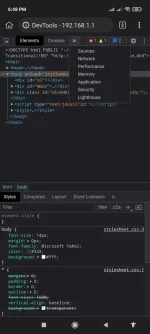
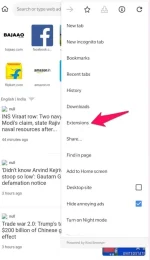
Add extension idolhi mga master...paano magkaroon ng webspy sa kiwi browser?..mag eenable sana ako ng telnet po
 webspy
paano yun lods?...wala talaga ako ideaAdd extension idol

Sa menu ng kiwibrowser idol, may extensions nakalagay don, add ka langpaano yun lods?...wala talaga ako idea
- Status
- Not open for further replies.
About this Thread
-
5KReplies
-
439KViews
-
368Participants
Last reply from:
-Synntaxx
-Synntaxx
New Topics
-
PLDT FiberHome HG6245D Brazilian Firmware
- Started by weah05
- Replies: 1
- 📡 Broadband, Modem, & Networking
-
-
Admin at password para sa ZTE model ZXHN F679D
- Started by TOpKILL
- Replies: 1
- 📡 Broadband, Modem, & Networking
-
FREE RAIN 101 UNLOCKER FW BUGOK 101
- Started by donamicvelazkiz
- Replies: 0
- 📡 Broadband, Modem, & Networking
-
[FREE] [APK] Rain101 Unlocker + BUGOK101 CFW [SUPER EZ]
- Started by bugok101
- Replies: 37
- 📡 Broadband, Modem, & Networking
-
Youtube No Ads DNS
- Started by cleverian
- Replies: 13
- 📡 Broadband, Modem, & Networking
-
Public DNS Tutorial
- Started by VCODE
- Replies: 13
- 📡 Broadband, Modem, & Networking
-
Open line Globe at home 101 5G, it's reasonable price?
- Started by G O Z A R U
- Replies: 13
- 📡 Broadband, Modem, & Networking
Trending Topics
-
-
-
-
-
Rain101 (Anti TTL) Bypass Datamaxx 5GUnli / Sayall 5G Unli ( No Connection )
- Shuuuuuuuun
Replies: 66 -
-
-
-
Online now
- Members online
- 1,256
- Guests online
- 6,833
- Total visitors
- 8,089